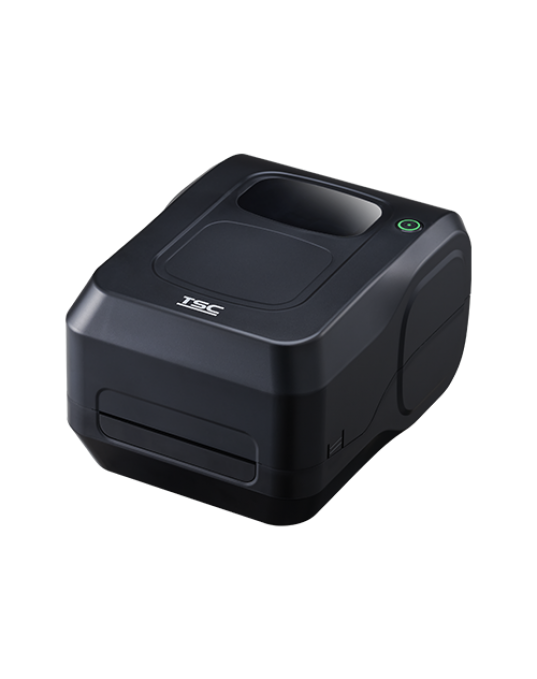
The TSC TL240 barcode printer can be used to print auxiliary labels, product barcode labels, price tags, and product information.
TSC TL240 – Powerful Configuration in a Compact Design
Outstanding Specifications
- Resolution: 203 dpi (8 dots/mm)
- Printing Method: Direct Thermal and Thermal Transfer
- Maximum Print Speed: 152 mm/s (6 inches/second)
- Print Width: 108 mm (4.25 inches)
- Memory: 128 MB Flash, 64 MB DRAM
- Connectivity: USB 2.0 and Ethernet 10/100 Mbps
- Sensors: Gap, black mark, ribbon end, head open
- Weight: 2.0 kg – compact, easy to move
- Barcode Support: 1D, 2D, QR Code, PDF417, GS1 DataBar...
- Print Head Life: 25 km or 12 months
Performance and Durability
The TL240 is equipped with a 32-bit RISC CPU for fast processing of complex print commands, and it is compatible with TSPL-EZD language – allowing the printer to automatically recognize EPL, ZPL, ZPL II, and DPL. This enables businesses to replace existing printers without modifying label templates. The 6 inches/second print speed ensures high productivity, suitable for environments with high-volume label printing.
Outstanding Features that Make the TL240 Superior
Easy to Deploy and Use
The printer supports plug-and-play: just connect via USB or Ethernet, install the driver, and start printing. The simple button interface includes a Feed/Pause button and a 3-color LED to indicate status. The transparent window design allows users to easily monitor the remaining paper supply.
Proactive Monitoring and Maintenance
TPH Care – a print head self-diagnosis feature helps users monitor hardware status, early detection of faded prints or weak print heads. TSC Console supports remote printer management: checking status, updating firmware, and monitoring multiple devices simultaneously – especially useful for chain stores or factory systems.
Environmentally Friendly
The entire packaging of the TL Series is 100% recyclable. The printer is Energy Star 3.2 certified and complies with RoHS, REACH, WEEE, China RoHS standards, ensuring safety and reduced emissions during operation.
Practical Applications of the TSC TL240 Printer
With a popular 4-inch print width, the TL240 meets diverse needs in many industries:
- Retail: Printing price tags, shelf labels, promotional labels.
- Warehousing & Logistics: Printing shipping labels, inbound labels.
- Food & Beverage: Printing traceability labels, expiration dates, QR codes.
- Manufacturing: Attaching component identification labels, internal control labels. printing auxiliary labels for product packaging...
Comparing TL240 and TE200 – Which Model to Choose?
Both are Desktop Printer series, TL240 has a resolution of 203 dpi, suitable for text labels, common barcodes and higher memory than TE200 which also has a resolution of 203 dpi – If you need performance and reasonable cost, TL240 is the optimal choice for SMB businesses.
User guide for TL240 barcode printer
- Connect the printer to the computer via USB or LAN.
- Install the driver and TSC Console software.
- Install the label decal roll and ribbon (if thermal transfer printing).
- Configure the paper size in the printing software, adjust the sensor.
- Print a test label before mass printing.
- Instructions for installing decal paper and ink ribbon for TSC TL240 printer
Product demo video
https://youtu.be/amZtu4CWAGA
Contact Mr. Trinh for consultation 0937 845 333 or VietPOS system
HO CHI MINH OFFICE
Add: 158/50 Hoang Hoa Tham, Ward Bay Hien, Ho Chi Minh City
Tel: 028 3 888 6180
Hotline: 0934 777 443 – 0934 777 445
Email: info@vietpos.vn
View map
CAN THO OFFICE
Add: 34 Nguyen Viet Dung – Cai Rang Ward – Can Tho
Tel: 0796700777
Hotline:
0796700777
Email: info@vietpos.vn
View map
NHA TRANG OFFICE
Add: 68 Nguyen Xien, Tay Nha Trang Ward, Khanh Hoa
Tel: 0258 3 550 677
Hotline:
0796 700 777 –
0932 420 567
Email: info@vietpos.vn
View map
DA NANG OFFICE
Add: 159 Le Dinh Ly – Hoa Cuong Ward – DN
Tel: 0236 3 990 777
Hotline:
0935 498 384 –
0905 999 656
Email: info@vietpos.vn
View map
HANOI OFFICE
Add: No. 15, Alley 61 Giap Nhi – Thinh Liet Ward – Hoang Mai District – Hanoi City
Tel: 024 39 035 999
Hotline:
0937 845 333
Email: info@vietpos.vn
View map