Mục lục bài viết (7)
WiFi authenticated timekeeping is a method for automatically recording work hours when an employee's device connects to the office's internal WiFi network. It combines dual MAC address and SSID authentication to ensure the individual clocking in is physically present at the workplace. This solution is being adopted by small and medium-sized businesses in Vietnam to eliminate proxy clocking, location fraud, and reduce administrative costs.
Current Office Timekeeping Management Challenges

⚠ Proxy Clocking, Remote Check-in: Employees ask colleagues to clock in for them or check in via app before arriving at the office.
⚠ Time Fraud: Manually modifying check-in/check-out times on the system or via uncontrolled apps.
⚠ Time-Consuming Administration: HR spends 3-5 hours weekly cross-referencing attendance and resolving timekeeping data discrepancies.
⚠ Lack of Real-time Data: Inability to monitor real-time employee presence status at the office.
How WiFi Authenticated Timekeeping Works
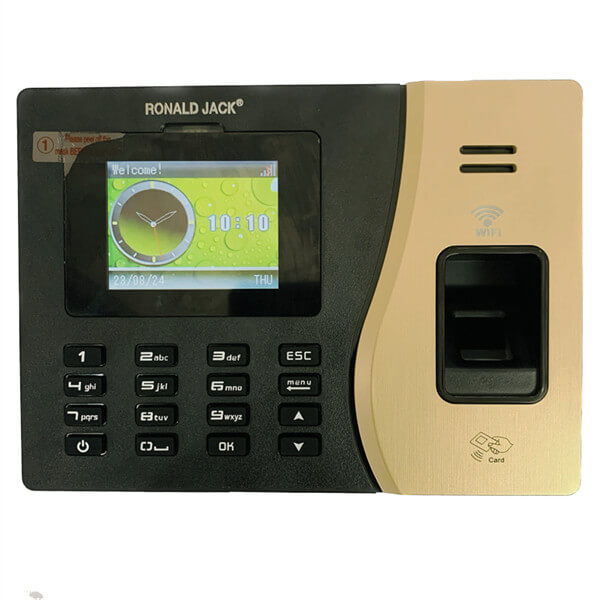


- 📶 Step 1 – Office WiFi Device Setup: Businesses establish an internal WiFi network (fixed SSID) in the main work area. Employee timekeeping devices (phones/tablets) must connect to this network.
- 🔐 Step 2 – Dual MAC + SSID Authentication: The Việt POS timekeeping software system records the device's MAC address and the WiFi network's SSID. Employees can only successfully check in when both match the registered data.
- 📱 Step 3 – Check-in via App or Browser: Employees open the timekeeping app or web check-in on their device connected to the office WiFi. Upon pressing the check-in button, the system automatically records the time and location.
- ☁️ Step 4 – Data Synchronization to Cloud: All check-in/check-out data is synchronized in real-time to the Việt POS cloud. HR and managers can view reports directly on the dashboard.
- 🧮 Step 5 – Automatic Time and Payroll Calculation: The software automatically calculates working hours, overtime, late arrivals, and early departures, then generates monthly payroll, reducing manual operations by 90%.
Specific Benefits of Implementing WiFi Timekeeping
🛡️ Eliminate 95% Proxy Clocking – Dual MAC + SSID authentication makes proxy clocking nearly impossible.
Bạn đang tìm sản phẩm cho chủ đề này?
Việt POS phân phối chính hãng — bảo hành 24-36 tháng, hỗ trợ kỹ thuật 24/7.

Timekeeping Software TAS-ERP (Standard)
TAS-ERP (Enterprise) Timekeeping Software
TAS-ERP Automatic Timekeeping Software (Professional)
TIME-ERP Timekeeping Software (Restaurants, Hotels)
⏱️ Save 200+ Administrative Hours/Year – HR no longer needs to manually cross-reference attendance records.
📊 Real-time Reports – Managers know exactly who is present and who is absent at any given moment.
💰 Reduced Equipment Costs – No need to purchase dedicated time clocks; leverage employee smartphones.
Applications in Small and Medium-Sized Business Offices

For offices with 15-50 employees, the WiFi timekeeping solution enables business owners to manage work hours without investing in fingerprint or facial recognition time clocks. Employees simply connect their phones to the office WiFi and check in via the app. Data is synchronized to the cloud, allowing HR to view monthly reports in just 5-10 minutes. Deployment costs are 50-70% lower compared to traditional biometric timekeeping systems.
Applications for Multi-Branch Businesses
For retail chains, showrooms, or multi-branch offices, WiFi timekeeping enables centralized management. Each branch has its own SSID, ensuring employees can only check in at their assigned location. Consolidated system-wide reports are displayed in real-time on a single dashboard. Việt POS supports remote configuration, facilitating rapid deployment across numerous branches within 1-2 days.
Related Equipment Products
Frequently Asked Questions
Is WiFi timekeeping accurate?
WiFi timekeeping with dual MAC + SSID authentication ensures employees are physically present to check in, achieving 95-99% accuracy with proper configuration and device management. However, VPN or MAC spoofing can still enable fraud. Therefore, combining it with facial recognition or GPS authentication is recommended for enhanced security.
What is the cost of deploying WiFi timekeeping?
Việt POS offers a comprehensive package including survey, equipment installation, software setup, training, and warranty, with costs from 500.000 – 1.500.000 đồng/employee/year, depending on scale. No additional equipment costs arise if employee phones are utilized. Contact 0935 498 384 for a detailed quotation.
Does WiFi timekeeping integrate with payroll software?
Yes, Việt POS timekeeping software automatically calculates working hours, overtime, and late/early arrivals, then generates monthly payroll. Data is synchronized in real-time, eliminating manual HR data entry. It supports Excel file export and API connections with popular accounting software for seamless integration.
Can employees clock in remotely via 3G/4G?
No, not if configured correctly. The system only permits check-ins when the device is connected to the registered office WiFi network (SSID + MAC). If an employee uses 3G/4G or an unauthorized WiFi, the system will reject the attempt and record it as a failed check-in, ensuring physical presence at the workplace.
How can employees be prevented from using VPNs to spoof WiFi?
To enhance security, Việt POS recommends combining WiFi timekeeping with facial recognition or GPS authentication. If a VPN is detected, the system can block check-ins or flag them for HR review. Additionally, restricting WiFi network access solely to registered MAC devices further strengthens security against spoofing attempts.
Is WiFi timekeeping suitable for businesses with fewer than 10 employees?
Yes, it is very suitable. For small-scale operations, WiFi timekeeping helps save equipment costs by eliminating the need for dedicated time clocks. Employees check in via a phone app, and data synchronizes automatically. Costs start from just 500.000 đồng/employee/year, significantly lower than traditional biometric systems.
How long does WiFi timekeeping deployment take?
Việt POS deploys the complete package within 1-2 working days for offices with 20-30 employees. The process includes: a half-day site survey, a half-day for software installation and WiFi configuration, and one training session for employees. For multi-branch businesses, an additional 1-2 days per branch is typically required for deployment.
Contact Việt POS now via hotline 0935 498 384 or email info@vietpos.vn for a consultation on a comprehensive WiFi timekeeping solution tailored to your business scale and budget.
Cần tư vấn thiết bị/giải pháp cụ thể?
Việt POS phản hồi trong 30 phút · Hotline 4 vùng · Khảo sát miễn phí.
Bài viết cùng chủ đề