Mục lục bài viết (7)
- Why Thermal Printers Are the Optimal Choice for Small Cafes
- Criterion 1: Suitable Print Speed and Paper Width
- Criterion 2: Integration Capability with POS Software
- Criterion 3: Durability and Actual Operating Costs
- Criterion 4: Brand and Technical Support in Vietnam
- Notes When Buying and Using Thermal Receipt Printers
- FAQ
7:30 AM — La Me cafe on Xa Dan street just opened, 8 customers waiting for latte take-away. The receipt printer jams for the second time this week, Ms. Ha has to handwrite the bill and then re-enter it into the evening notebook. A suitable thermal receipt printer not only prints fast but also reduces paper costs by 60-80%, has fewer errors, and integrates directly with the cafe management software. This article guides you through 5 criteria for choosing a thermal printer for a 20-40m² cafe, based on real implementation experience at over 300 Vietnamese cafes.
Why Thermal Printers Are the Optimal Choice for Small Cafes
Thermal receipt printers print directly onto thermal paper without needing ink or ribbon, helping cafes reduce supply costs by 70-85% compared to dot matrix printers, with print speeds 3-4 times faster, and operating 40-50dB quieter — important for cafe spaces requiring quietness.
Traditional dot matrix printers are still common in many small cafes, but have 3 major weaknesses: noise levels of 60-70dB annoy customers in the morning, ink ribbons need replacing 2-3 times/month (150-200k VND each), and slow print speeds of 1-2 lines/second cause customer wait times during peak hours. A4 laser printers are too bulky and consume high power (300-500W vs 24-48W for thermal printers).
Direct thermal printing technology works by the print head heating to 60-80°C, causing the thermal paper to turn black at the print positions. With no complex mechanical parts, the failure rate drops by 60-70%, and maintenance time decreases from 4-6 times/year to 1-2 times. Anh Duong cafe in Binh Thanh switched from a dot matrix to a Bixolon thermal printer, saving 2.8 million VND in supply costs and reducing technician calls by 12 times over 8 months.
Criterion 1: Suitable Print Speed and Paper Width
Small cafes (20-40m²) serving 60-120 customers/day should choose a printer with a speed of 150-250mm/second and paper width of 58mm (short bill) or 80mm (detailed bill with logo). This speed prints a 10-15 line bill in 2-3 seconds, fast enough for the 7-9 AM peak hour.
Bạn đang tìm sản phẩm cho chủ đề này?
Việt POS phân phối chính hãng — bảo hành 24-36 tháng, hỗ trợ kỹ thuật 24/7.
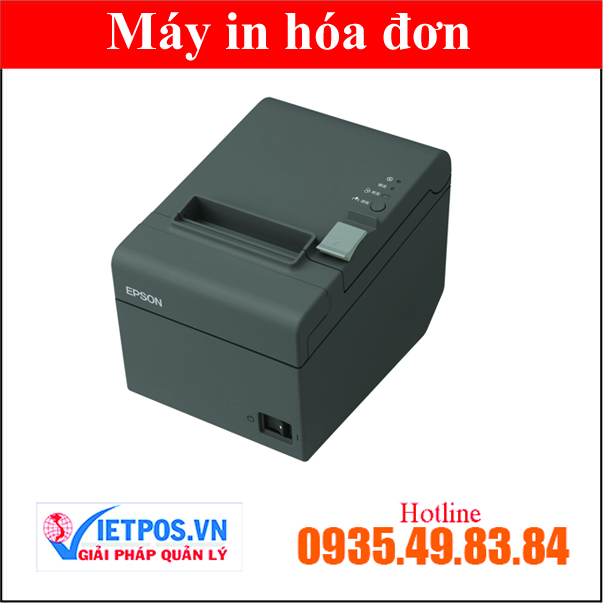
Epson TM-T82 (USB) Receipt Printer for Supermarkets
SKU: Epson TM-T82 Epson TM-T82 Receipt Printer for Supermarkets (USB + LAN)
SKU: Epson TM-T82-1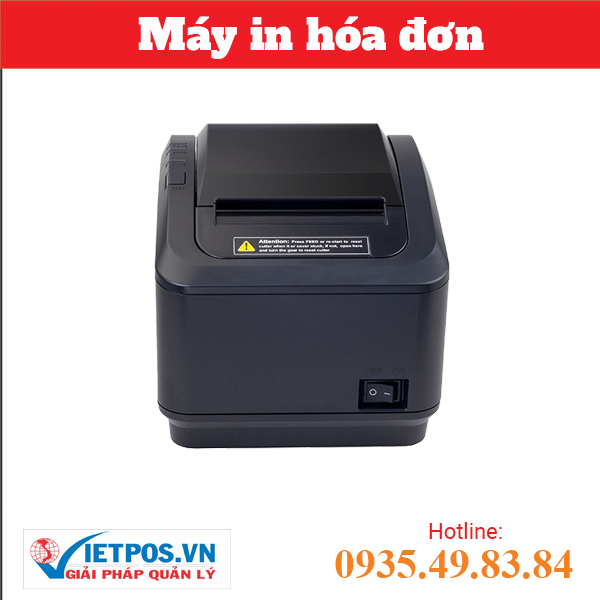
XP-K200 USB Receipt Printer suitable for various models
XP-K200 LAN receipt printer suitable for various models
- 58mm width: Suitable for short bills (item name, price, total), saves 30-40% paper, roll price 8-12k VND/30m roll. Used for take-away heavy cafes or simple menus under 20 items.
- 80mm width: Can print cafe logo, payment QR code, promotional information. Roll price 15-22k VND/45m roll. Suitable for cafes wanting branding or complex menus with 30+ items and toppings.
- 150mm/s speed: Sufficient for cafes under 80 customers/day, printer price 1.8-2.5 million VND.
- 200-250mm/s speed: Necessary if peak hour serves 15-25 customers/hour, printer price 2.8-4.2 million VND.
Mr. Tuan — Huong Que cafe in District 10 — initially bought a cheap 58mm printer for 1.6 million VND, but after 3 months had to switch to 80mm because customers complained they couldn't see item names clearly and there was no MOMO QR code to scan. He spent an extra 1.2 million VND, but the QR code scan rate increased by 40%, reducing cash handling time.
Criterion 2: Integration Capability with POS Software
The printer must support USB, LAN (Ethernet), or Bluetooth connections to integrate directly with cafe management software. USB is the most stable for fixed cashier counters, Bluetooth is convenient for mobile devices taking orders at tables, and LAN is suitable for cafes with 2-3 computers/tablets sharing one printer.
Modern POS software like VietPOS supports ESC/POS commands — the common print command standard for Epson, Bixolon, Xprinter. When staff press "Print bill" on the screen, the software automatically sends print commands for item names, quantities, prices, totals, taxes, and payment QR codes to the printer within 0.5-1 second. No complex driver installation or manual command entry is needed.
| Connection Type | Advantages | Disadvantages | Printer Price (million VND) |
|---|---|---|---|
| USB | Stable, no interruptions, fast data transfer | Must be near the computer (1.5-3m cable), not usable with tablets | 1.8-3.5 |
| Bluetooth | Wireless, portable, usable with phones/tablets | Occasional disconnection, battery charge 6-8h/day | 2.2-4.0 |
| LAN (Ethernet) | Multiple devices can share, stable, no battery concerns | Requires router, static IP setup, more complex | 2.8-5.0 |
| USB + LAN | Flexible, can switch as needed | 15-25% higher price | 3.2-5.5 |
Ms. Lan — Doi Cat Thao Dien cafe — chose the Bixolon SRP-350III with both USB and LAN (3.6 million VND). The cashier counter uses USB, while staff iPads serving garden tables connect via LAN to print kitchen bills. Flexible for future expansion without buying additional printers.
Criterion 3: Durability and Actual Operating Costs
A good thermal printer can withstand 3-5 million prints (equivalent to 8-12 years for a cafe with 80-120 bills/day), with ceramic or thick-film print heads lasting 40-60% longer than standard heads. Operating costs are mainly thermal paper at 300-500k VND/month, with no ink or ribbon costs.
Key points on hidden costs:
- Low-quality thermal paper: Cheap at 6-8k VND/roll but text fades after 2-3 months, leading to customer complaints about unverifiable old bills. Good paper at 12-18k VND/roll keeps text clear for 12-18 months.
- Dirty print head: If not cleaned 1-2 times/month with specialized alcohol, paper residue builds up causing faint or streaky print. Print head replacement costs 400-800k VND if it fails early.
- Power consumption: Thermal printers use only 24-48W when printing, 2-5W on standby. A cafe open 12h/day costs 5-10k VND/month in electricity, 15-20 times less than a laser printer.
Binh Minh cafe in Cau Giay has used the Xprinter XP-N160II (2.3 million VND) for 18 months, printing 95,000 bills without needing a print head replacement. Good quality thermal paper costs 420k VND/month, total operating cost under 500k VND/month — 60% cheaper than the old dot matrix printer.
Criterion 4: Brand and Technical Support in Vietnam
Prioritize brands with official warranty centers in Vietnam (Epson, Bixolon) or reputable distributors with 24/7 technical support via hotline and Zalo. A printer failure during peak hours without quick support can lose 15-30 customers, resulting in 1-2 million VND in lost revenue.
3 popular brands for Vietnamese cafes:
- Epson (TM-T82III, TM-T20III): Japanese brand, most durable but high price 4-6 million VND. Official warranty 12-24 months, spare parts readily available. Suitable for chain cafes or long-term investment.
- Bixolon (SRP-350III, SRP-330II): Korean brand, price 3-4.5 million VND, good balance between price and quality. 12-month warranty, good support through Vietnamese distributors.
- Xprinter (XP-N160II, XP-Q200II): Chinese brand, cheap at 1.8-3 million VND, suitable for small cafes with limited budgets. 6-12 month warranty, need to choose a reputable distributor for fast support.
Note: Avoid buying unknown origin printers on e-commerce platforms for 900k-1.5 million VND. These are often refurbished or made with poor components, failing after 2-4 months without warranty. Mr. Hung — Tan Phat Tan Binh cafe — bought a 1.2 million VND printer on Shopee; after 3 months the print head burned out, costing an additional 2.5 million VND for a new printer and 2 days of downtime.
Notes When Buying and Using Thermal Receipt Printers
After choosing the right printer, note 4 points: check driver compatibility with your operating system (Windows 10/11, Android, iOS), do a real print test with your POS software before payment, ask the supplier for instructions on print head cleaning and basic error handling, and buy 2-3 spare rolls of the same thermal paper to avoid interruptions.
Checklist when receiving the printer:
- Check that the printer produces a clear sample bill, no streaks, no faint text
- Test the connection with your laptop/tablet/phone
- Request installation and a test print from the actual POS software (not just a printer test)
- Obtain a warranty card with a stamp, clearly stating the warranty period and conditions
- Save the technical support hotline number, ask about average response time (should be under 2-4 hours)
- Buy an extra roll of genuine thermal paper from the same brand to compare print quality
Regarding storage and cleaning: Place the printer in a dry area, away from direct sunlight and moisture (1-2m from the brewing station). Clean the print head with 70° alcohol and a soft cloth 1-2 times/month when the printer is cool. Do not leave thermal paper in the printer for more than 3-5 days without use, as damp paper can jam the roller. Replace the paper roll when 5-10cm remain to avoid running out during a busy shift.
FAQ
Can a thermal receipt printer print 2 copies?
No. Thermal printers only print 1 copy directly onto thermal paper. If you need 2 copies (1 for the customer, 1 for the cafe's records), you have 2 options: (1) Press print twice on the POS software — uses more paper but is fast, or (2) Save the electronic bill in the software and only print for the customer upon request — saves 40-60% paper, a trend in modern cafes. Only dot matrix printers can print 2-3 carbon copies, but they are much slower and noisier.
Is thermal paper toxic, and is it safe for coffee customers?
Good quality thermal paper (BPA-free type) is safe for health. BPA is a controversial chemical in older thermal paper, but reputable brands in Vietnam have switched to BPA-free paper or use BPS (less toxic) since 2023. Printed bills do not come into direct contact with food/drinks; customers hold the bill for a few seconds and then put it in their wallet, so the risk is low. If concerned, choose thermal paper labeled "BPA-free" or "Phenol-free" — the price is only 10-15% higher.
Are thermal printers noisy, and do they affect the cafe atmosphere?
Thermal printers operate at 45-55dB — equivalent to a soft conversation or a computer fan. They are much quieter than dot matrix printers (60-75dB). In a cafe with background music at 50-60dB, customers sitting 3-5m from the counter hardly hear the printer. It is only clearly audible when standing right at the cashier counter. If the cafe requires absolute quiet (like a reading cafe), place the printer behind the counter or use a light partition.
Choosing the right thermal receipt printer helps your cafe save 2-4 million VND/year in operating costs, reduce technical error handling time by 60-80%, and increase customer service speed by 15-25 seconds per bill — crucial for retaining customers during peak hours. VietPOS provides a complete solution including cafe management software + thermal printer + barcode scanner + payment devices, pre-integrated without complex setup. Contact the hotline 0935 498 384 for free consultation on the most suitable printer for your cafe's scale and budget, with a detailed quote within 30 minutes.
Cần tư vấn thiết bị/giải pháp cụ thể?
Việt POS phản hồi trong 30 phút · Hotline 4 vùng · Khảo sát miễn phí.
Bài viết cùng chủ đề