Mục lục bài viết (8)
- Why do Vietnamese schools need RFID smart libraries in 2026?
- 6 steps to deploy an RFID smart library for schools
- 8-14 week timeline — phased to avoid semester disruption
- RFID or barcode — which should schools choose?
- Which RFID equipment is mandatory for school libraries?
- Vietnamese school specifics — 5 notes not found in foreign documentation
- Reference costs and acceptance checklist
- Frequently Asked Questions

An RFID smart library is a library model that uses radio frequency chips (RFID) attached to each book copy to automate check-in/check-out, inventory, and security control of materials. In Vietnam, following Decision 206/QĐ-TTg on education digital transformation, many middle schools, high schools, and colleges have included smart libraries in their 2025-2027 investment plans, with mandatory requirements: RFID equipment meeting international standards, software meeting MARC21 cataloging standards, and SIP2 protocol for self-service.
Deploying an RFID smart library for schools consists of 6 steps: (1) survey collections and infrastructure, (2) select RFID equipment meeting ISO 18000-3/ISO 15693 standards, (3) apply tags and assign item codes, (4) install ILS software compliant with MARC21 and SIP2, (5) install self-checkout kiosks and security gates, (6) train staff and students. Total time is 8-14 weeks, with costs depending on scale of 5,000-30,000 book copies.
Table of Contents
- Why do Vietnamese schools need RFID smart libraries in 2026?
- 6 steps to deploy an RFID smart library for schools
- 8-14 week timeline — phased to avoid semester disruption
- RFID or barcode — which should schools choose?
- Which RFID equipment is mandatory for school libraries?
- Vietnamese school specifics — 5 notes not found in foreign documentation
- Reference costs and acceptance checklist
- Frequently Asked Questions
Why do Vietnamese schools need RFID smart libraries in 2026?
Why do Vietnamese schools need RFID smart libraries in 2026?

Three main pressures: first, the collection scale of middle schools, high schools, and colleges is typically 5,000-30,000 copies, and manual inventory takes 2-3 weeks each year; second, library staff is thin (1-3 people) but reading rooms operate 2-3 shifts; third, there is a requirement for transparent patron and learning material data under the education sector digital transformation project. RFID addresses all three through automation.
Specifically, a manual check-in/check-out transaction (logging, stamping, book checking) takes 3-5 minutes; with RFID and self-checkout kiosks, students scan their patron card plus a stack of books, and the system records it in 10-20 seconds. Inventory using handheld readers scanning shelves drops from 2-3 weeks to 1-2 days for a collection of 10,000-20,000 copies. This is why schools with reading rooms over 150m² and collections over 8,000 copies typically choose RFID instead of upgrading barcode.
6 steps to deploy an RFID smart library for schools
Related Products
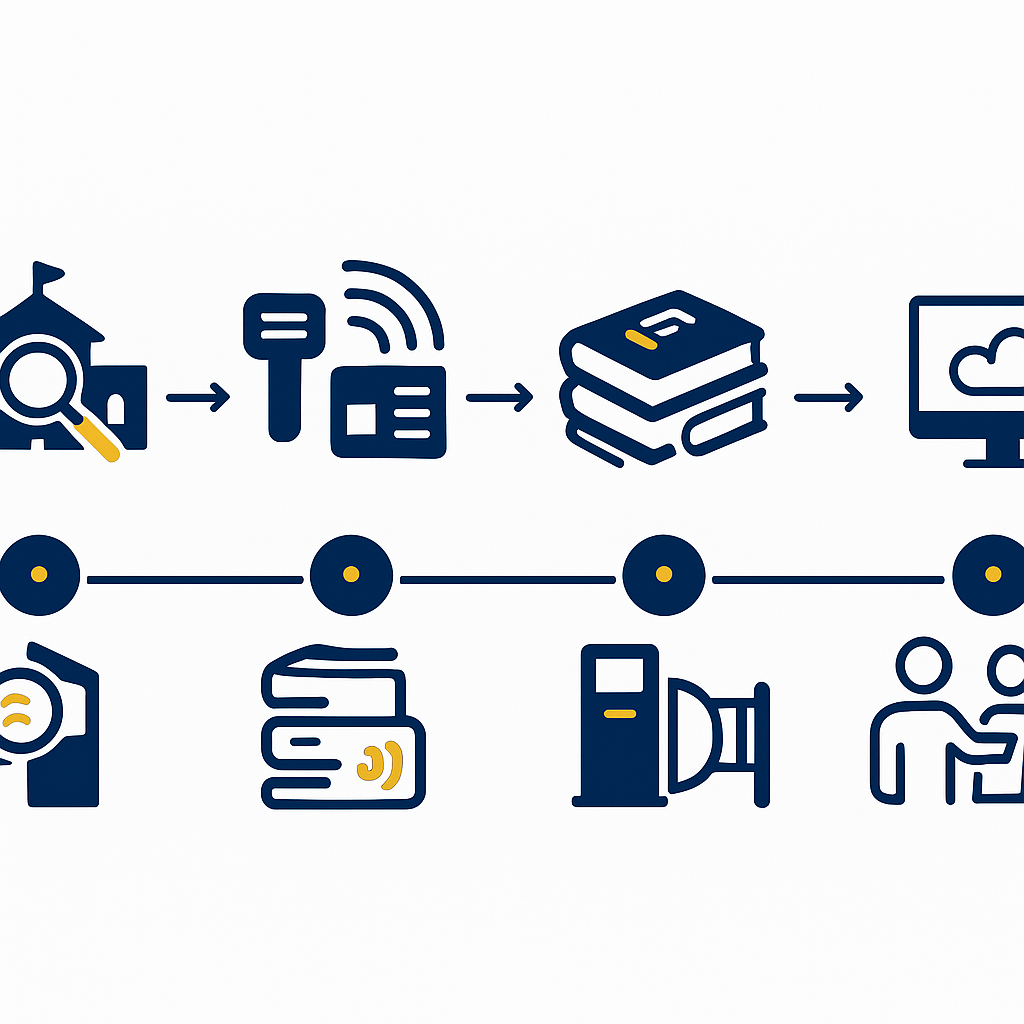
The standard roadmap consists of 6 sequential steps: current state survey, RFID equipment selection, tag application and item code assignment, international-standard ILS software installation, self-checkout kiosk and security gate installation, training and handover. Actual total time is 8-14 weeks depending on scale, and can be split into 2 phases to avoid semester disruption.
Step 1 — Survey collections, infrastructure, and patron flow
The deployment team visits the school, physically counts book copies by collection (lending collection, in-house reading collection, rotating collection), measures reading room area, and checks power outlets and LAN/WiFi network lines at the librarian counter. At the same time, they record patron flow: peak entry/exit hours, number of loans per day, and lending policy by grade level. Survey results determine the number of readers, number of kiosks, and security gate positions. This step takes 3-5 working days.
Step 2 — Select RFID equipment meeting international standards
RFID equipment for libraries must comply with ISO 18000-3 (radio communication at 13.56 MHz) and ISO 15693 (vicinity cards), HF frequency 13.56 MHz — this is the globally common standard for libraries, unlike UHF used in logistics. Tags must have anti-collision capability to read multiple books simultaneously; readers and security gates must support SIP2 protocol to connect with ILS software. For Vietnamese schools, prioritize spine-label tags with adhesive that resists humidity and heat in non-air-conditioned reading rooms.
Step 3 — Apply RFID tags and assign item codes (accession numbers)
Each book copy is assigned a unique item code (accession number) in the software, then an RFID tag is applied to the spine or inside cover. Tag application should be done in batches of 200-500 copies per day to avoid cataloging bottlenecks. Schools should take advantage of year-end inventory to both apply tags and reconcile data, avoiding doing it twice. For a collection of 10,000 copies, two staff members applying tags takes about 3-4 weeks.
Step 4 — Install integrated library management software compliant with MARC21, SIP2
This is the step that determines future scalability. The software must meet international standards: MARC21 cataloging per AACR2, ISO 2709 record exchange, Z39.50 record retrieval, and especially SIP2 support so self-checkout kiosks and security gates can communicate with the system. If the school wants to interconnect with provincial libraries or the LGSP axis, XML/LGSP standards are also needed. See also RFID-Integrated Library Management Software: 2026 Selection Guide to understand the standards checklist before signing a contract.
Step 5 — Install self-checkout kiosks and security gates
Self-checkout kiosks are placed in the reading room; students scan their patron card then place a stack of books on the RFID reading pad — the system identifies multiple books simultaneously and prints a loan slip in 10-20 seconds. Security gates are placed at exits, detecting tags not recorded as borrowed and triggering an alarm. For schools with multiple exits, 2-3 gates or a double gate are needed. Kiosk placement should be 2-5m from the librarian counter so staff can assist promptly when students make errors.
Step 6 — Train staff, students, and handover
Training is divided into 2 groups: library staff (cataloging, handling faulty tag issues, exporting circulation reports) and students (kiosk operation, new lending rules). Staff training takes 2-3 sessions, students 1 session during the weekly assembly. After training, run manual and RFID in parallel for 1-2 weeks before fully switching to automation.
8-14 week timeline — phased to avoid semester disruption
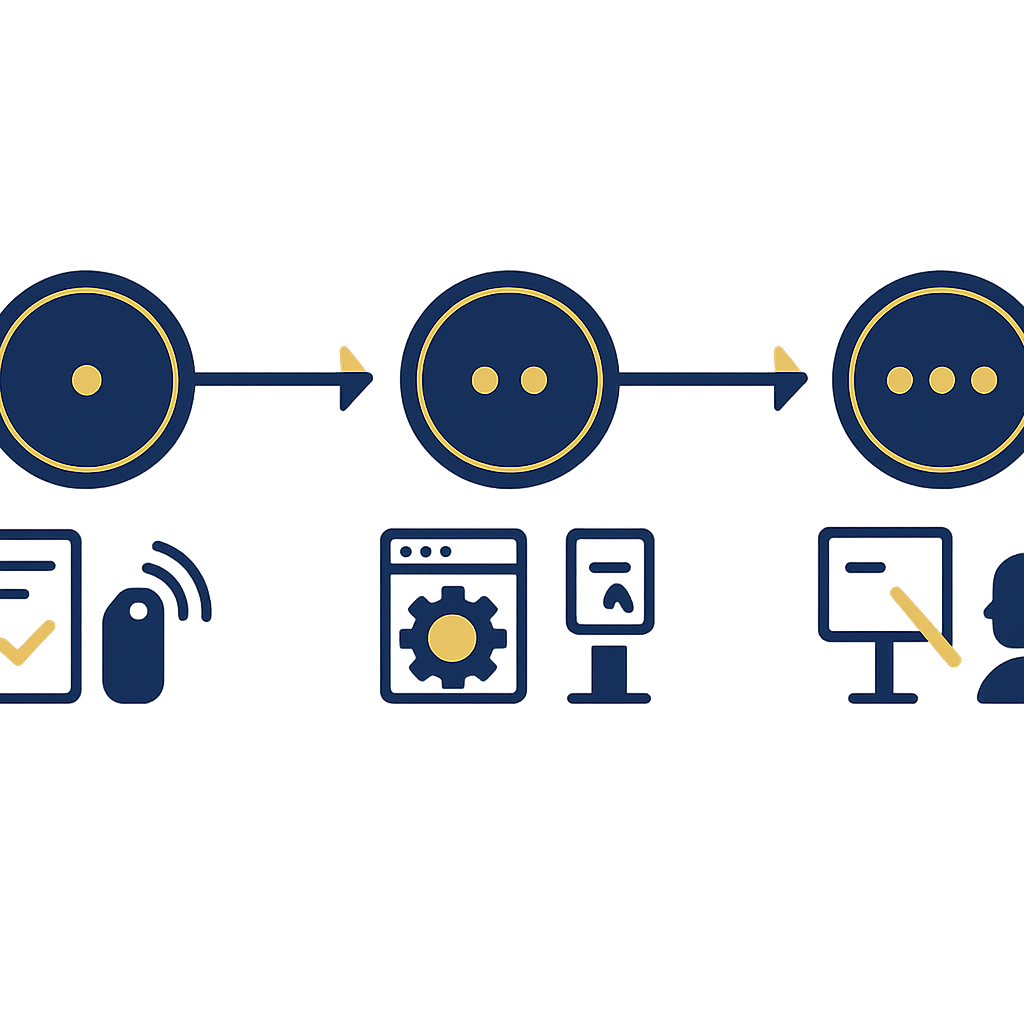
For a school with 10,000-15,000 book copies, total deployment time is 10-12 weeks. Optimal phasing: phase 1 (weeks 1-6) completes survey, tag application, software installation, and parallel running; phase 2 (weeks 7-12) installs kiosks, security gates, training, and full switchover. This approach allows leveraging summer break or the period between two semesters.
| Week | Main Tasks | Responsible Party | Handover Deliverable |
|---|---|---|---|
| 1-2 | Survey collections, infrastructure, patron flow | Deployment team + library staff | Survey report, proposed configuration |
| 3-6 | Apply RFID tags, assign accession numbers, install ILS software | Library staff + technical team | 100% of copies tagged, software operational |
| 7-9 | Install self-checkout kiosks, security gates, trial run | Technical team | Kiosks + gates operating stably |
| 10-12 | Training, parallel running, handover | Deployment team + school board | Acceptance, transition to official operation |
RFID or barcode — which should schools choose?
Barcode suits schools with under 3,000 book copies and low lending volume. RFID suits schools with 5,000 copies or more, reading rooms open multiple shifts, needing fast inventory and self-service. RFID investment cost is 2-4 times higher than barcode but saves 60-80% of inventory time and enables automated check-in/check-out outside office hours.
| Criterion | Barcode | RFID |
|---|---|---|
| Read multiple books simultaneously | No (1 code per scan) | Yes (10-30 tags per scan) |
| Inventory of 10,000 copies | 2-3 weeks | 1-2 days |
| Self-service check-in/check-out | Limited | Full via SIP2 |
| Security gate against book removal | No | Yes |
| Initial investment cost | Low | 2-4 times higher |
Which RFID equipment is mandatory for school libraries?
The minimum set includes 5 categories: spine-label RFID tags, desktop readers, handheld readers for inventory, self-checkout kiosks, and security gates. Depending on scale, RFID patron card printers and automated book drops can be added if the school opens gates outside hours.
- RFID tags 13.56 MHz ISO 15693: applied to spine or inside cover, anti-collision, readable when stacked.
- Desktop reader: placed at the librarian counter for fast check-in/check-out, tag writing/erasing.
- Handheld reader: used for collection inventory, scanning shelves in 1-2 days instead of 2-3 weeks.
- Self-checkout kiosk: allows students to self-scan card + book stack, print loan slips.
- Security gate: placed at exits, detects tags not recorded as borrowed.
For schools wanting to upgrade reading rooms into multi-purpose spaces, see also Smart People Counting Camera - Surveillance Solution 2024 to measure patron traffic during peak hours for shift staffing.
Vietnamese school specifics — 5 notes not found in foreign documentation
Deployment in Vietnam must handle 5 specifics: academic-year budgeting (cannot sign contracts spanning 2 fiscal years), non-air-conditioned reading rooms affecting tag adhesive, primary students using cards that are easily lost, inventory tied to semester end, and teacher-librarians needing a simple interface.
- Academic-year budgeting: split the contract into 2 packages (equipment + software) to match budget approval cycles.
- Heat- and humidity-resistant tag adhesive: non-air-conditioned reading rooms have 70-85% humidity, so acrylic adhesive tags must be chosen.
- Patron cards for young students: use plastic cards with lanyards, with a lost card fee of 20,000-50,000 VND.
- Inventory tied to semester end: schedule inventory twice a year coinciding with semester reviews to leverage manpower.
- Part-time staff: software interface must be in Vietnamese, with few steps, and ready-made report templates per Department of Education requirements.
Reference costs and acceptance checklist
RFID school library costs depend on 3 variables: number of book copies, number of kiosks, number of security gates. For a school with 10,000 copies, 1 kiosk, and 1 single gate, total investment typically falls in the range of several hundred million VND — request quotes broken down into 3 parts: tags, equipment, and software for easier approval.
Minimum acceptance checklist:
- Tags read stably at 99%+ when stacked 5-10 copies.
- Self-checkout kiosk processes 1 transaction in under 30 seconds.
- Security gate detects 100% of tags not recorded as borrowed, with no false alarms when students pass through with backpacks.
- Software can export circulation reports by grade level and by month.
- Patron data and MARC21 records can be exported in ISO 2709 format for future interconnection.
Schools planning to expand reading rooms into multi-purpose learning spaces (maker space, self-study area) can see also How to Set Up a Booth in a Shopping Mall to learn how to arrange traffic flow and signage in large spaces.
Frequently Asked Questions
How long does it take to deploy an RFID smart library for a school?
For a school with 10,000-15,000 book copies, total time is 10-12 weeks; schools with under 5,000 copies can shorten it to 8 weeks. If split into 2 phases to avoid semester disruption, total time extends to 12-14 weeks but operations remain continuous. The most time-consuming step is tag application (accounting for 40-50% of the total schedule).
Which RFID tag type should Vietnamese schools choose?
Choose HF 13.56 MHz tags compliant with ISO 15693, with anti-collision capability to read multiple books simultaneously. For non-air-conditioned reading rooms, prioritize humidity-resistant acrylic adhesive. Avoid UHF tags (860-960 MHz) because although they read at longer range, they are prone to interference when many tags are stacked — not suitable for library lending operations.
Do self-checkout kiosks need an internet connection?
Kiosks connect to ILS software via LAN or internal WiFi, using SIP2 protocol. Public internet is not mandatory, but if the school wants remote OPAC lookup or data interconnection with provincial libraries, internet is needed. Kiosks should have a temporary offline mode to avoid disruption when the internal network has issues.
Do security gates trigger false alarms when students carry backpacks through?
Good-quality RFID gates only detect library tags at 13.56 MHz frequency, unaffected by metal in backpacks or phones. However, gates placed too close to bookshelves (under 1.5m) may misread tags on shelf books. Standard placement: at least 2m from the nearest shelf, and calibrate sensor thresholds during acceptance testing.
Can an existing barcode library be upgraded to RFID without replacing the software?
Yes, if the current software supports SIP2 and has an RFID module. In that case, you only need to apply RFID tags to book copies (keeping the old barcode for parallel lookup), install RFID equipment, and enable the module. If the old software does not support SIP2 or does not meet MARC21 standards, the software should be replaced to avoid having to redo it later.
What is the approximate investment cost for an RFID school library?
Cost depends on the number of book copies, number of kiosks, and number of security gates. A school with 10,000 copies, 1 kiosk, and 1 single gate typically falls in the range of several hundred million VND. Request suppliers to provide quotes broken into 3 parts: tags, equipment (kiosks, gates, readers), and software and training — for easier budget allocation by academic year.
Cần tư vấn thiết bị/giải pháp cụ thể?
Việt POS phản hồi trong 30 phút · Hotline 4 vùng · Khảo sát miễn phí.
Bài viết cùng chủ đề