Mục lục bài viết (9)
- #What is a barcode label printer and why is it needed for export?
- #What are the criteria for choosing a label printer for an export warehouse?
- #Which TSC, Godex, XPrinter label printer models should be chosen?
- #What are the installation and operating costs for a label printer?
- #Which label printer is most durable for 24/7 export warehouses?
- #How to integrate label printers with warehouse management systems?
- #Next steps
- Related products
- Related articles
Exporting goods requires strict control from warehouse to port. Barcode labels are essential tools for tracking quantity, batches, and logistics information. However, not all label printers can handle the workload of large export warehouses — requiring machines with high capacity, exceptional durability, and continuous printing capabilities.
What is a barcode label printer and why is it needed for export?
A barcode label printer is a specialized printing device used to print barcodes, QR codes, and product information onto decal paper, PET, or Polypropylene. For export goods, label printers help record batch information, HS codes, destination country, and production dates — increasing transparency and compliance with customs regulations.
Large export warehouses often process 500-5000 labels/day. Conventional label printers (with a speed of 50-100mm/second) are insufficient. A printer with a speed of 150-300mm/second, a resolution of 203-300 DPI, and the ability to print continuously 24/7 without overheating is necessary.
What are the criteria for choosing a label printer for an export warehouse?
Key criteria include: (1) printing speed (mm/second), (2) resolution (DPI), (3) supported media types, (4) network connectivity, (5) durability (MTBF), (6) operating costs (ink, printhead). For export, it is recommended to choose a printer with a speed of 200-300mm/second, 203-300 DPI, support for USB + LAN + Ethernet, and an MTBF of ≥ 50 million lines.
Bạn đang tìm sản phẩm cho chủ đề này?
Việt POS phân phối chính hãng — bảo hành 24-36 tháng, hỗ trợ kỹ thuật 24/7.
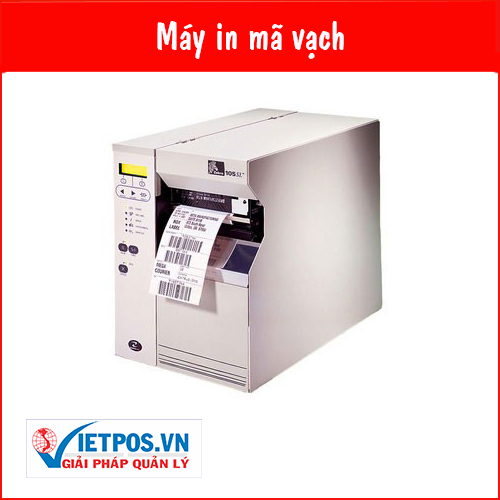
Zebra-105SL Barcode Label Printer
SKU: ZEBRA 105SL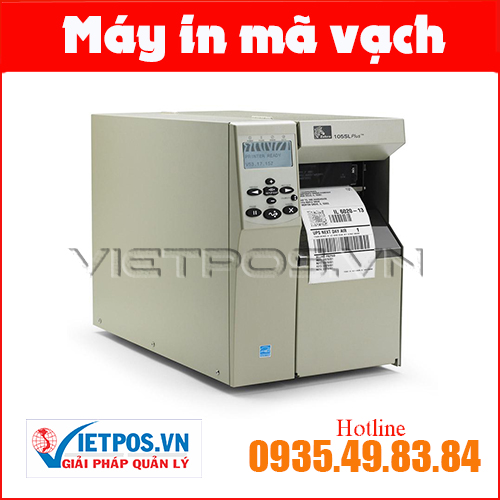
Zebra-105SL-Plus Barcode Label Printer
SKU: ZEBRA 105SL PLUS
Zebra-R110xi4 Barcode Label Printer
SKU: ZEBRA R110XI4
Zebra-220XI4 Barcode Label Printer
SKU: 220XI4Are you looking for products on this topic?
Việt POS is an authorized distributor — 24-36 months warranty, 24/7 technical support.
- Printing speed: 150-300mm/second (depending on daily goods volume)
- Resolution: 203 DPI (standard) or 300 DPI (high detail)
- Media type: Decal PET, Polypropylene, plain paper 4x6 inch or A4
- Connectivity: USB, LAN, Ethernet, supports Windows/Linux drivers
- Durability: MTBF ≥ 50 million lines, 2-3 year warranty
- Operating costs: Ink/ribbon 500K-2M/month, printhead replacement every 3-6 months
Which TSC, Godex, XPrinter label printer models should be chosen?
The three leading vendors for export are TSC (Taiwan), Godex (Taiwan), XPrinter (China). TSC TTP-286MT and TTP-345 are suitable for high-capacity printing at 200-300mm/second. Godex EZ-2050 offers a balance of price-performance. XPrinter XP-365B is suitable for medium-sized businesses requiring LAN + USB connectivity.
| Model | Capacity | DPI | Estimated Price | Suitable for |
|---|---|---|---|---|
| TSC TTP-286MT | 200mm/s | 203 DPI | 12-15 million | Medium-large warehouses, continuous printing |
| TSC TTP-345 | 300mm/s | 300 DPI | 18-22 million | High-end export, detailed |
| Godex EZ-2050 | 150mm/s | 203 DPI | 8-11 million | Small-medium warehouses, low cost |
| XPrinter XP-365B | 150mm/s | 203 DPI | 6-9 million | Medium businesses, LAN+USB |
According to Việt POS's experience implementing for export warehouses in Ho Chi Minh City and Dong Nai, the TSC TTP-286MT is the most popular choice — balancing capacity, durability, and cost. The Godex EZ-2050 is suitable if the budget is limited but still requires printing 300-500 labels/day.
What are the installation and operating costs for a label printer?
The installation cost for a label printer includes: (1) machine price (6-22 million VND), (2) installation + configuration (1-2 million VND), (3) management software (2-5 million VND, if needed), (4) monthly operating costs (500K-2M VND for ink, ribbon, maintenance). The total estimated cost for the first year is 15-35 million VND, depending on the model and scale.
- Machine price: 6-22 million VND (Godex EZ-2050 cheapest, TSC TTP-345 highest)
- Installation + configuration: 1-2 million VND (includes testing, training)
- Management software: 2-5 million VND (if integrated with ERP/WMS)
- Operating/month: 500K-2M VND (ink, ribbon, periodic maintenance)
- Warranty: 2-3 years, 24/7 technical support
Export businesses often achieve ROI within 12-18 months by reducing manual labeling labor costs by 20-35% and increasing goods control speed.
Which label printer is most durable for 24/7 export warehouses?
The most durable printers for 24/7 operation are the TSC TTP-286MT and TSC TTP-345 — MTBF ≥ 50 million lines, industrial design, supporting continuous printing without overheating. The Godex EZ-2050 is also reliable (MTBF 40 million lines) but more suitable for 16-20 hours/day operation.
To ensure long-term durability, it is necessary to: (1) clean the printhead weekly, (2) replace ribbon/ink on schedule, (3) monitor room temperature (18-28°C), (4) perform periodic maintenance every 6 months. Việt POS provides periodic maintenance services for export warehouses — helping machines operate stably and extending their lifespan to 5-7 years.
How to integrate label printers with warehouse management systems?
Modern label printers support USB, LAN, Ethernet, and API connections. Integration with warehouse management systems (WMS) or ERP helps automate label printing when goods are received, dispatched, or prepared for export. The process involves: (1) goods scanned by barcode upon receipt, (2) the system automatically sending print commands, (3) the printer automatically printing labels, (4) staff applying labels to the goods.
The TSC TTP-286MT, Godex EZ-2050, XPrinter XP-365B models all support Windows/Linux drivers and REST APIs. Việt POS assists with integration with popular systems — contact us for consultation on configurations suitable for your warehouse processes.
Contact comprehensive warehouse management solution to learn more about integrating label printers with WMS.
Next steps
The Việt POS technical team provides free surveys and consultations to help you choose the appropriate label printer configuration for your warehouse size and export volume. Contact hotline 0935 498 384 or refer to:
Need specific equipment/solution consultation?
Việt POS responds within 30 minutes · 4 regional hotlines · Free survey.
Related products
Related articles

Cần tư vấn thiết bị/giải pháp cụ thể?
Việt POS phản hồi trong 30 phút · Hotline 4 vùng · Khảo sát miễn phí.
Bài viết cùng chủ đề