Mục lục bài viết (8)
- What is an automatic locker system and how does it differ from a manual cloakroom?
- Why are manual cloakrooms becoming an operational bottleneck?
- How does the 5-step self-deposit workflow at the locker work?
- How do the 5-language interface and accessibility mode function?
- How do alerts and screen customization help proactive operation?
- Can the locker operate when offline?
- Can a single locker change its usage model without hardware replacement?
- How to centrally manage multiple lockers across multiple branches via the web?
An automatic locker system is an electronic locker system with a touchscreen that allows customers to self-deposit and retrieve items without needing staff at a counter. In shopping malls, supermarkets, and gyms in Vietnam, this model is gradually replacing manual cloakrooms because it reduces staffing, minimizes lost cards, and shortens waiting times during peak hours. The VDT Locker electronic locker control software is developed by Việt Đức Trí and supplied and implemented by Việt POS.
Automatic locker systems allow customers to self-deposit and retrieve items via a touchscreen, eliminating the need for manual cloakrooms. The system uses a 6-digit PIN, card, or facial recognition (does not store original images, only encrypted features in accordance with Decree 13/2023/NĐ-CP), displays 5 languages, operates offline when disconnected, and enables centralized multi-branch management via the web. VDT Locker software is developed by Việt Đức Trí and supplied and implemented by Việt POS.
Table of Contents
- What is an automatic locker system and how does it differ from a manual cloakroom?
- Why are manual cloakrooms becoming an operational bottleneck?
- How does the 5-step self-deposit workflow at the locker work?
- How do the 5-language interface and accessibility mode function?
- How do alerts and screen customization help proactive operation?
- Can the locker operate when offline?
- Can a single locker change its usage model without hardware replacement?
- How to centrally manage multiple lockers across multiple branches via the web?
- Summary Table: Choosing a Locker Model by Type
- Common Mistakes When Deploying Automatic Locker Systems
- Frequently Asked Questions
What is an automatic locker system and how does it differ from a manual cloakroom?
An automatic locker system is an electronic locker with a touchscreen, allowing customers to self-select a compartment, set a PIN or swipe a card, and retrieve items without staff assistance. Unlike manual cloakrooms that require staff to issue and verify cards, automatic lockers operate 24/7, eliminate easily lost plastic cards, and do not require staff on duty.
Why are manual cloakrooms becoming an operational bottleneck?
Related Solutions
VDT Locker Smart Locker: a single locker configurable as a deposit locker, staff locker, parcel locker, asset loan locker, or paid locker. See solution and book a demo →
Manual cloakrooms require staff per shift, issue easily lost plastic cards or keys, cause queues during peak hours, and foreign visitors often cannot read Vietnamese instructions. These are recurring bottlenecks daily at shopping malls, supermarkets, and gyms.
- High staffing costs: Each counter requires staff throughout opening hours, plus verification time for item retrieval.
- Lost plastic cards and keys: Paper cards or mechanical keys are easily misplaced, requiring manual handling each time, affecting customer experience.
- Queues during peak hours: On weekends and during rush hour, customers converge at the cloakroom simultaneously.
- Language barrier: Foreign visitors cannot read Vietnamese instruction signs and must ask staff for help.
- Difficult to scale: Expanding to new branches requires hiring and training additional counter staff.
How does the 5-step self-deposit workflow at the locker work?
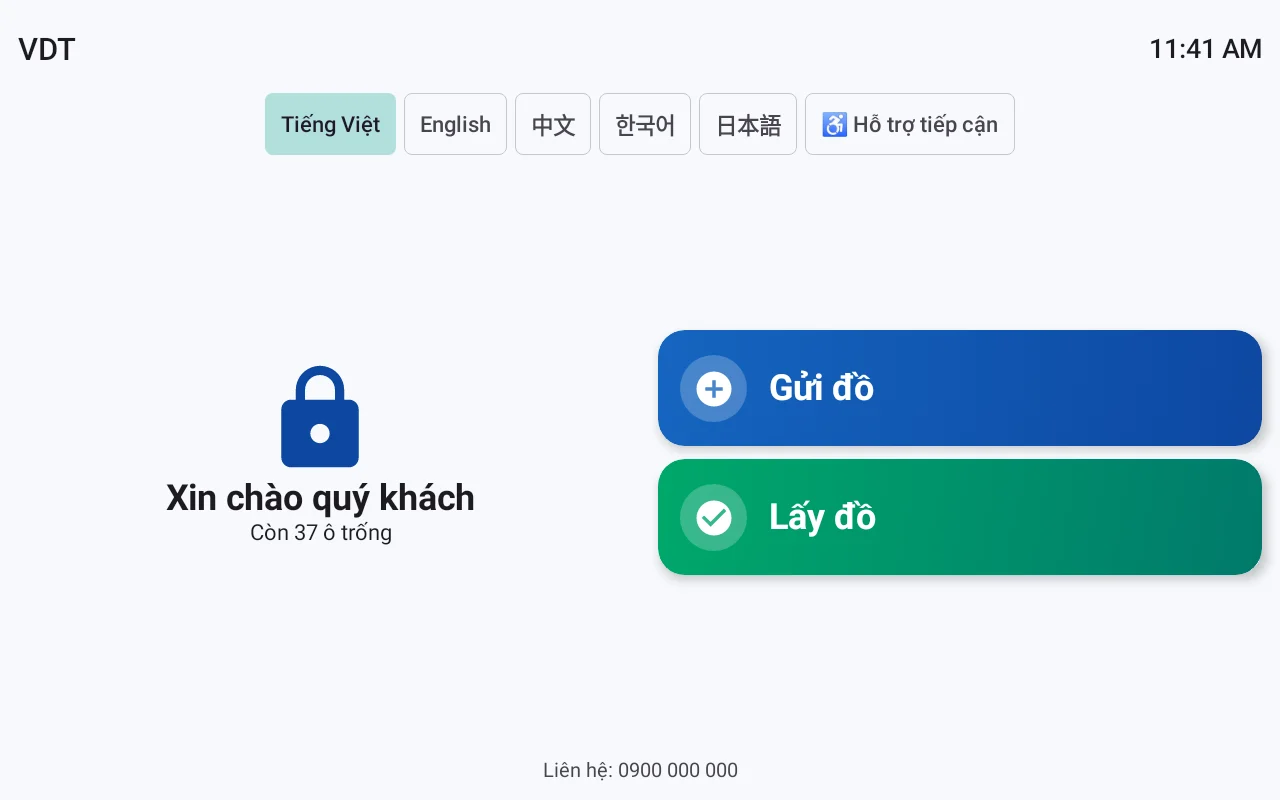
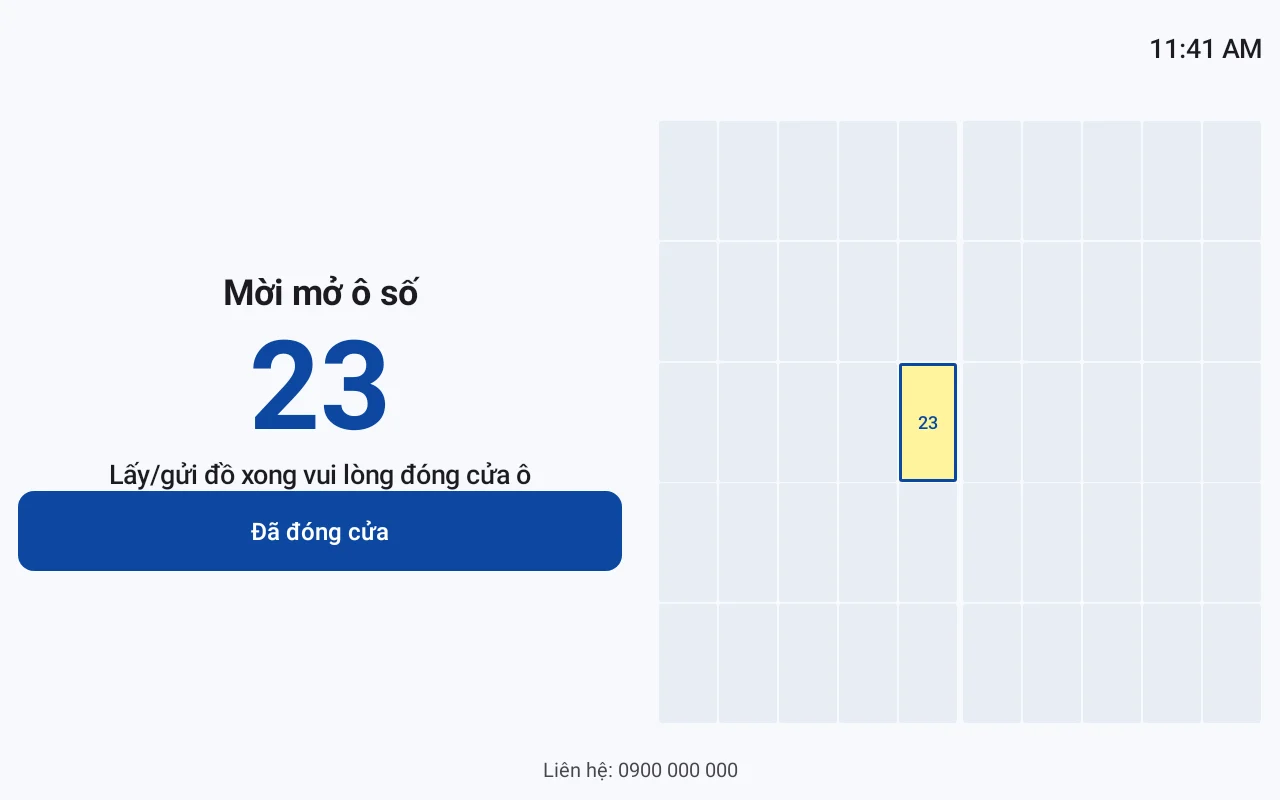
Customers follow 5 steps on the touchscreen: press Deposit, select compartment size S/M/L/XL with available slots, set a 6-digit PIN or swipe a card or authenticate facial recognition, view a diagram pointing to the opened compartment, receive a code, and print a ticket. Customers follow on-screen instructions independently, without needing staff nearby.
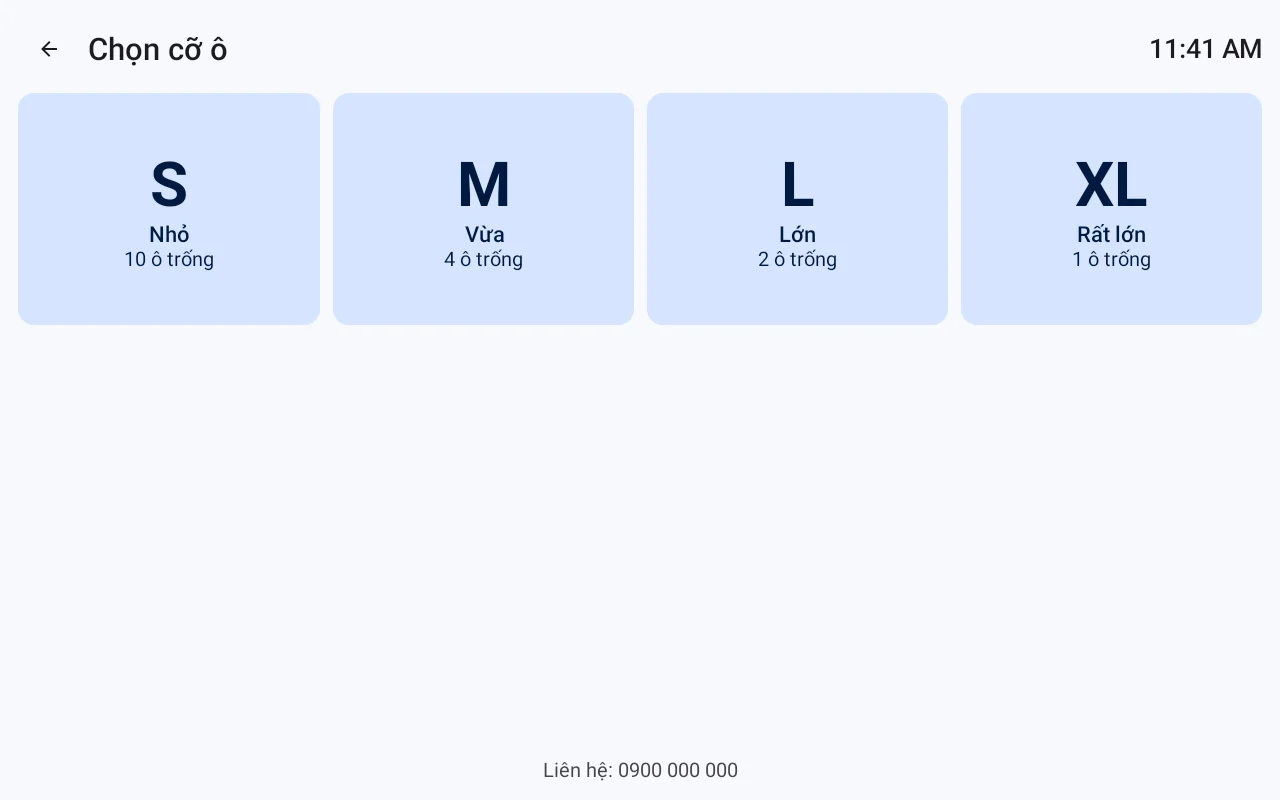
- Press Deposit: The welcome screen appears in the selected language, displaying large Deposit and Retrieve buttons.
- Select compartment size: Customers see real-time available slots for sizes S/M/L/XL and choose the appropriate size for their handbag, backpack, or luggage.
- Authentication: Set a 6-digit PIN, swipe a card, or authenticate facial recognition (optional, does not store original images, only encrypted features, with consent recorded in accordance with Decree 13/2023/NĐ-CP).
- Compartment diagram: The screen displays a locker diagram, with the newly opened compartment clearly marked to prevent customers from opening the wrong one.
- Receive code and print ticket: The locker prints a paper ticket with the PIN, compartment number, and deposit time; customers store the ticket or remember the code.
To retrieve items, customers press Retrieve, enter the PIN or swipe a card or authenticate facial recognition; the locker automatically opens the correct compartment and records the retrieval time. If a customer forgets the code, the handling procedure is pre-configured by the operating entity, typically involving verification at a service counter or via hotline.
How do the 5-language interface and accessibility mode function?
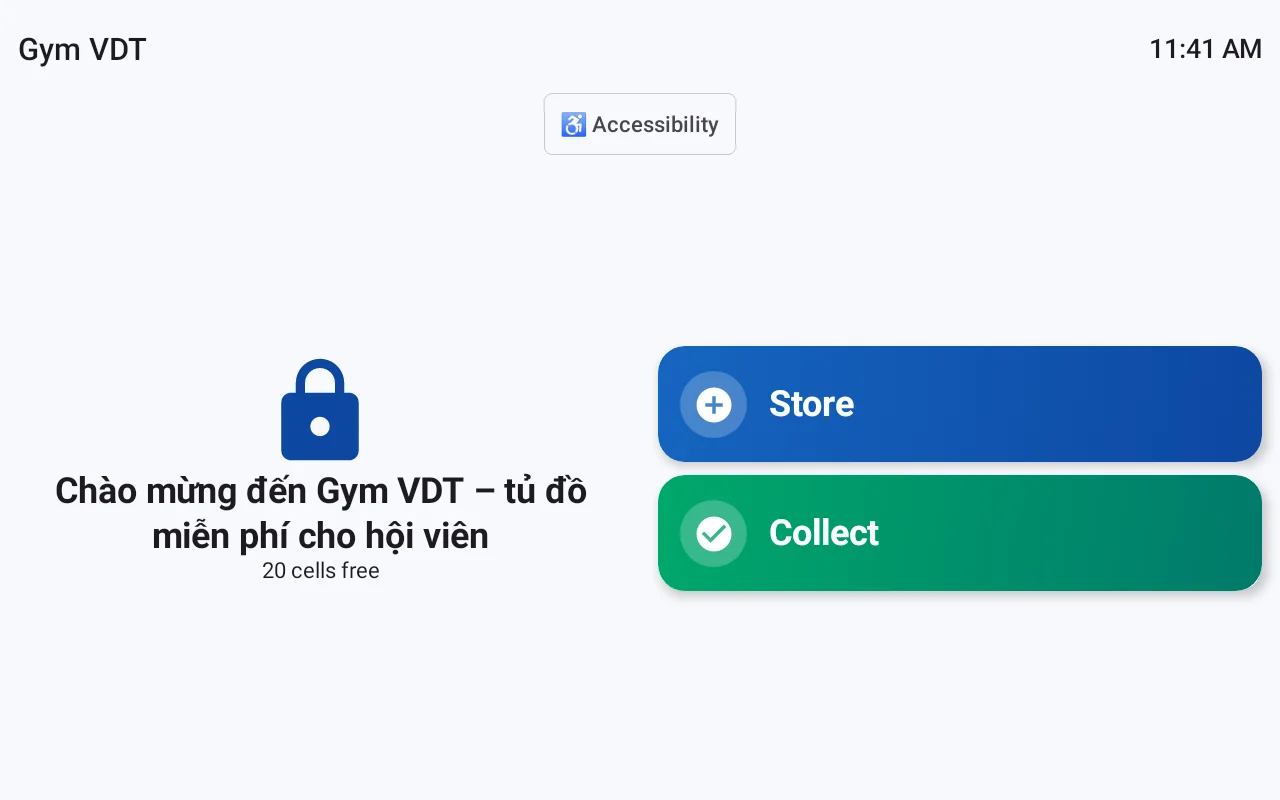
The locker screen supports 5 languages: Vietnamese, English, Chinese, Korean, and Japanese, switchable with a single tap on the welcome screen. The accessibility mode uses large text, large buttons, and high contrast, suitable for elderly users and foreign visitors.
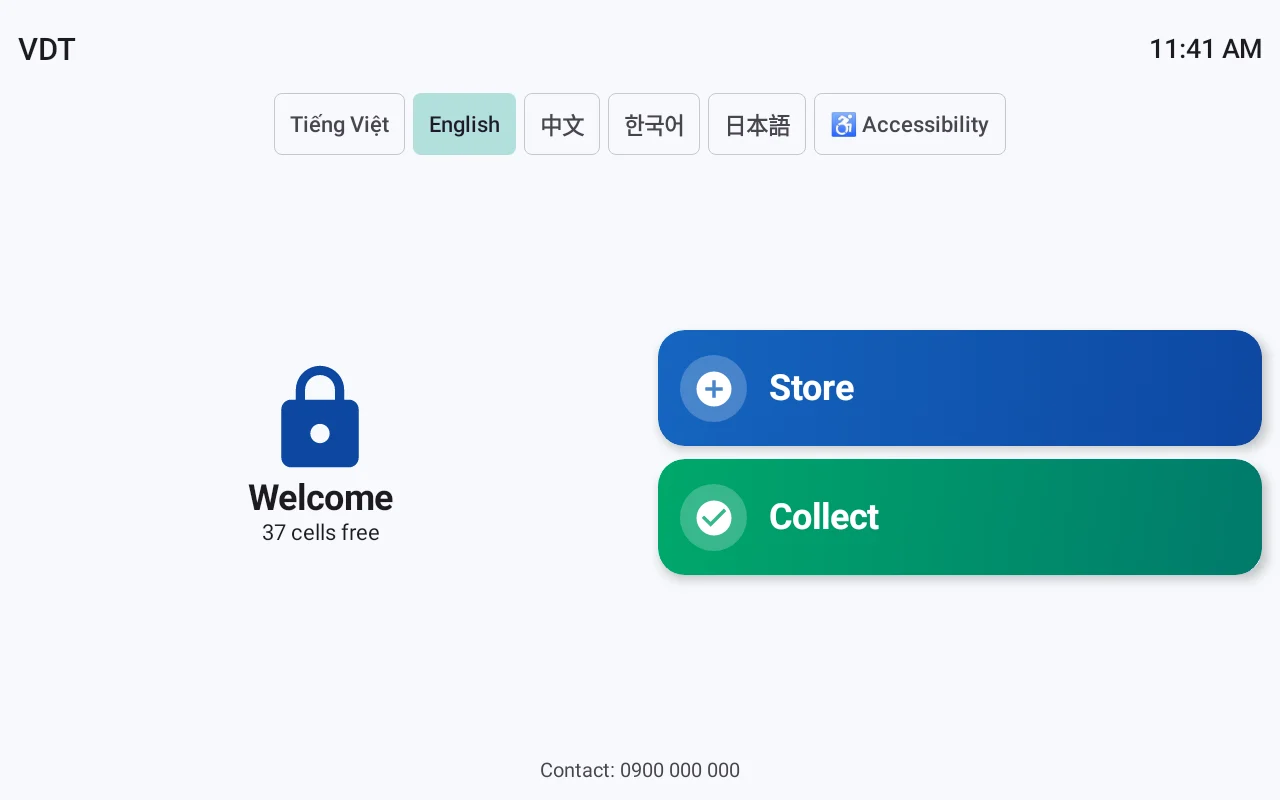
- One-tap language change: Displays flags or language names directly on the welcome screen; customers tap to switch without navigating deep menus.
- Large text mode: Increases font size and button size, reduces secondary actions, suitable for elderly users.
- Large buttons: Wide touch area, prevents accidental presses when customers are carrying bags.
- Visual instructions: Each step includes illustrative images, reducing reliance on reading text.
For foreign visitors, switching to English, Chinese, Korean, or Japanese directly on the screen helps them complete transactions independently, reducing the need to call staff. This is often overlooked when choosing locker systems for shopping malls with high international visitor traffic.
How do alerts and screen customization help proactive operation?
The system alerts when items are overdue, when a locker door is left open, and when an incorrect code is entered multiple times. The idle screen can be customized with greetings, logos, and advertising images, transforming the locker into a media point instead of just a storage device.
- Overdue deposit alert: The system records deposit times and alerts when a configured threshold is exceeded for staff action.
- Open door alert: Detects when a door is not properly closed, preventing situations where a compartment is open but not locked.
- Multiple incorrect code entry alert: Limits the number of attempts, reducing the risk of brute-force attacks.
- Customizable greetings, logos, advertising images: The idle screen displays brand messages or promotions, configured by the operating entity.
These alerts reduce reliance on manual staff observation and generate data for the operating entity to review anomalies daily or per shift.
Can the locker operate when offline?
Yes. Transaction data is stored on the locker, allowing customers to deposit and retrieve items even when offline, and then synchronizes when connectivity is restored. This is a mandatory requirement for lockers located in basements, areas with weak signals, or during network interruptions.
When offline, the locker operates using local data: PINs, compartment statuses, and transaction history are still recorded. When connectivity is restored, data synchronizes with the web management interface. This approach prevents service interruptions and maintains a stable customer experience, especially for lockers in areas with poor signal.
Can a single locker change its usage model without hardware replacement?
Yes. VDT Locker software allows changing the usage model via settings, without needing hardware replacement. The same locker can switch between free, hourly-paid, per-use, or employee-only models, depending on operational goals.
- Free model: Suitable for shopping malls aiming to enhance customer experience.
- Paid model: Configurable by hour or per use, suitable for gyms, swimming pools, entertainment areas.
- Internal model: For employees or partners, authenticated by employee ID cards.
- Configuration-based conversion: Change parameters on the web management interface, no hardware intervention required.
Separating software from hardware allows the operating entity to quickly test new models without purchasing different lockers when policies change.
How to centrally manage multiple lockers across multiple branches via the web?
Centralized web management allows monitoring all lockers across all branches, with each business having its own dedicated URL and 2-factor authentication. The operating entity can view compartment status, transaction history, alerts, and configure settings remotely instead of checking each locker individually.
Cần tư vấn thiết bị/giải pháp cụ thể?
Việt POS phản hồi trong 30 phút · Hotline 4 vùng · Khảo sát miễn phí.
Bài viết cùng chủ đề


