Mục lục bài viết (9)
- #Why replace printheads for receipt, barcode, and label printers?
- #How much does it cost to replace printheads for various machine types?
- #Common printhead types for receipt, barcode, and label printers
- #Safe and proper printhead replacement procedure for various machine types
- #How to know when a printhead needs replacement?
- #Choosing the right printhead for each machine type
- #Periodic maintenance plan to optimize costs
- Related products
- Articles on the same topic
Replacing printheads for receipt, barcode, and label printers is one of the most important periodic maintenance tasks that Vietnamese businesses often encounter. Although printhead costs are relatively high — especially for industrial machines — timely replacement helps maintain stable print quality, prevents production disruptions, and extends equipment lifespan.
Why replace printheads for receipt, barcode, and label printers?
Printheads are consumable parts that directly contact paper, ink, and high temperatures daily. Based on Việt POS's experience with retail businesses, warehouses, and logistics, printheads gradually wear out over time, leading to reduced print quality: faded, uneven, or broken lines. If not replaced promptly, the machine can be completely damaged, incurring much higher repair costs.
Regular printhead replacement helps: (1) maintain barcode and receipt sharpness, (2) reduce barcode reading errors in warehouse control, (3) extend machine lifespan by 1-2 years, (4) prevent unexpected production downtime.
How much does it cost to replace printheads for various machine types?
The cost of printheads depends on the machine type and printing technology. With industrial printers (Zebra, HPRT, Datalogic), printheads often account for 30-50% of the new machine's price. For example, a Zebra ZT411 machine costs about 15-20 million VND, while a replacement printhead costs 5-8 million VND. With mobile printers (XPrinter, HPRT MP-T2, Pos 5809DD), printheads are cheaper, costing around 1-3 million VND.
Bạn đang tìm sản phẩm cho chủ đề này?
Việt POS phân phối chính hãng — bảo hành 24-36 tháng, hỗ trợ kỹ thuật 24/7.
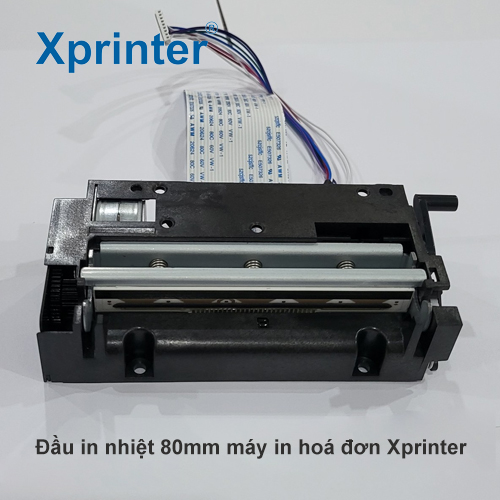
Xprinter C300H Printhead — Replacement Part for 80mm Receipt Printers
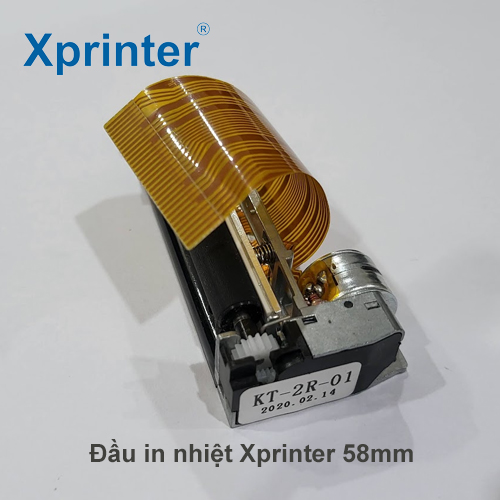
Xprinter P201A Printhead — Replacement Part for Receipt Printers
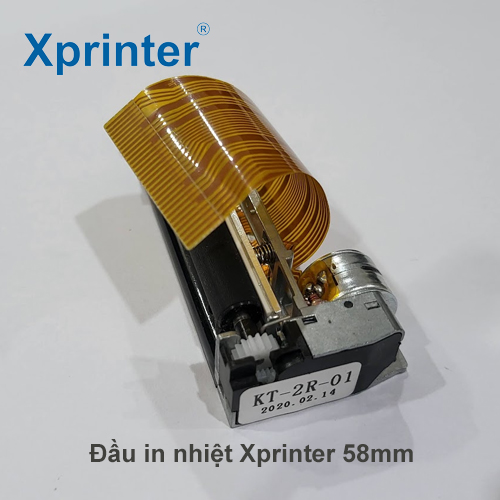
Xprinter P103 Printhead — Replacement Part for Barcode Printers
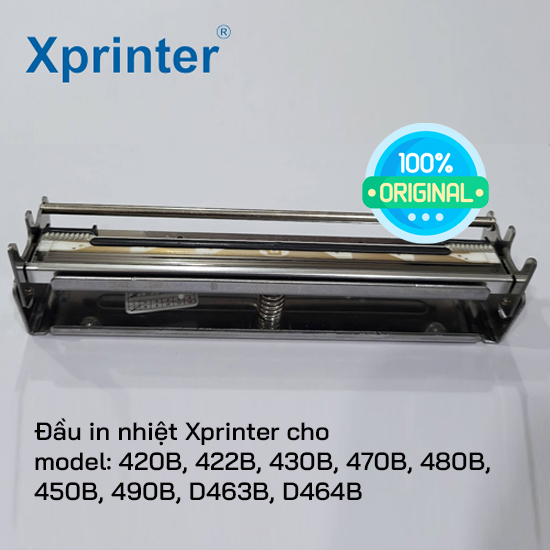
Genuine Xprinter D463B Printhead for Barcode Label Printers
Are you looking for products on this topic?
Việt POS is an authorized distributor — 24-36 month warranty, 24/7 technical support.
However, printhead lifespan can extend 2-5 years depending on daily usage. If a printer operates 8-10 hours/day, the printhead may need replacement after 18-24 months. If used lightly (2-3 hours/day), the lifespan can extend up to 3-5 years. Calculating annual costs, regular printhead replacement is still cheaper than repairing a broken machine.
Common printhead types for receipt, barcode, and label printers
The market offers printheads for various machine types. Below is a comparison table of common printhead types that Việt POS supplies to Vietnamese businesses:
| Machine Type | Printhead Model | Technology | Lifespan | Application |
|---|---|---|---|---|
| Zebra ZT411 / ZT610 | Thermal printhead 203/300 dpi | Industrial high temperature | 2-4 years | Barcode, cold storage labels |
| HPRT MP-T2 / MP-T3 | Thermal printhead 203 dpi | Medium temperature | 2-3 years | Receipts, mobile invoices |
| XPrinter XP-365B | Thermal printhead 203 dpi | Standard temperature | 1.5-2.5 years | Labels, retail barcodes |
| Pos 5809DD | Thermal printhead 203 dpi | Standard temperature | 1.5-2 years | Mobile receipts, invoices |
Note: Thermal printheads are the most common type for receipt, barcode, and label printers. A resolution of 203 dpi is suitable for most retail and warehouse applications. A resolution of 300 dpi is used for small labels or barcodes requiring high accuracy.
Safe and proper printhead replacement procedure for various machine types
Printhead replacement is not a complex task, but it requires adherence to a process to avoid machine damage. Basic steps:
- Turn off the machine and wait for it to cool down (5-10 minutes) to avoid burns.
- Open the top cover of the machine, locate the printhead locking mechanism (usually 2 locks on the sides).
- Press the locks to gently remove the old printhead.
- Clean the printhead area with a soft cloth and 70% alcohol to remove dust and old ink.
- Install the new printhead, ensuring it aligns precisely with the contact pins.
- Close the locking mechanism, close the machine cover.
- Turn on the machine, run a test print of 5-10 pages to check quality.
If you are not confident, contact the Việt POS technical team for installation and machine calibration support. Việt POS provides periodic maintenance services for businesses in HCM, Đà Nẵng, Cần Thơ, Hà Nội.
How to know when a printhead needs replacement?
Signs that a printhead needs replacement: (1) faded or uneven print quality, (2) broken or unreadable barcodes, (3) receipts with white or black streaks, (4) machine issuing printhead temperature error warnings, (5) printhead lifespan exceeding 2-3 years of continuous use.
To monitor lifespan, most industrial printers (Zebra, HPRT, Datalogic) have print count meters or automatic maintenance alerts. Check the machine menu or contact the supplier for precise remaining lifespan.
Choosing the right printhead for each machine type
When purchasing replacement printheads, it is essential to accurately identify the machine model and technical specifications. Việt POS supplies genuine printheads for popular machine models: Zebra, HPRT, XPrinter barcode/label printers, and mobile receipt printers. Each printhead comes with detailed installation instructions and a 12-month warranty.
In addition to the printhead, you will need: (1) suitable printing paper (thermal paper or labels), (2) ink if the machine uses an ink system, (3) a soft cloth and 70% alcohol for cleaning. Việt POS offers comprehensive maintenance packages including printheads, paper, ink, and installation services.
Periodic maintenance plan to optimize costs
To reduce printer operating costs by 20-30%, businesses should establish a periodic maintenance plan: (1) check print quality weekly, (2) clean the machine monthly, (3) replace printheads after 18-24 months of continuous use, (4) store spare printheads to prevent production disruptions. Large retail businesses (Lá Me, Tân Phát, Đồi Cát) often sign maintenance contracts with Việt POS for 24/7 support and a 15-20% reduction in maintenance costs compared to individual purchases.
Contact Việt POS for consultation on a maintenance plan suitable for your business needs. Hotline: 0935 498 384 (KT: 0932 555 260). Offices: HCM (0934 777 443), Đà Nẵng (0905 999 656), Cần Thơ (0931 777 527), Hà Nội (0937 845 333).
Need specific equipment/solution consultation?
Việt POS responds within 30 minutes · 4 regional hotlines · Free survey.
Related products
Articles on the same topic

Cần tư vấn thiết bị/giải pháp cụ thể?
Việt POS phản hồi trong 30 phút · Hotline 4 vùng · Khảo sát miễn phí.
Bài viết cùng chủ đề