Mục lục bài viết (12)
- #What are the steps for installing an RF security gate?
- #How does the installation location of an RF security gate affect its performance?
- #How to configure RF frequency to suit the Vietnamese environment?
- #How to calibrate RF security gate sensor sensitivity?
- #Connecting RF security gates to POS systems and surveillance cameras
- #Periodic maintenance and optimization of RF security gates
- #Cấu hình tần số RF như thế nào cho phù hợp với môi trường Việt Nam?
- #Hiệu chỉnh độ nhạy cảm biến cổng từ an ninh RF như thế nào?
- #Kết nối cổng từ an ninh RF với hệ thống POS và camera giám sát
- #Bảo trì và tối ưu hóa cổng từ an ninh RF định kỳ
- Related products
- Related articles
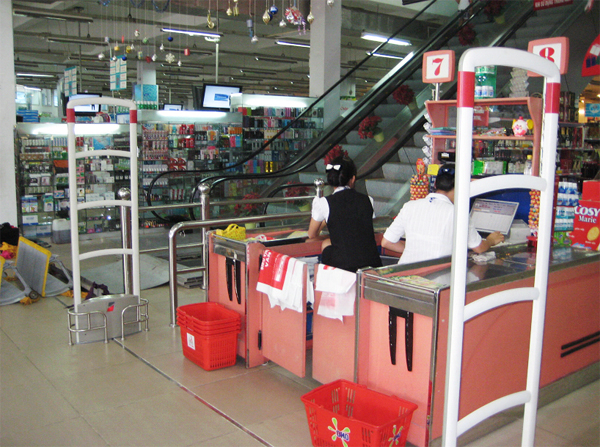
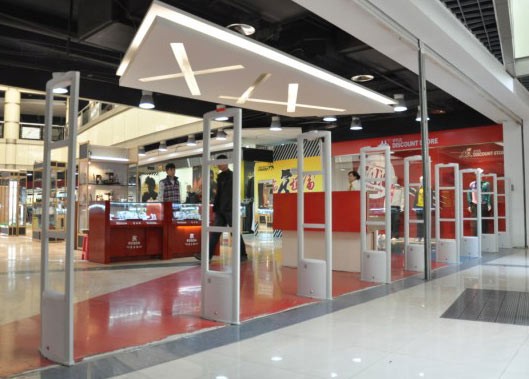
RF security gates are important equipment for protecting goods in supermarkets, retail stores, and libraries. Proper installation of RF security gates not only enhances theft prevention efficiency but also optimizes customer experience. This article provides a detailed guide on the installation, configuration, and maintenance process for RF systems for Vietnamese businesses.
What are the steps for installing an RF security gate?
The installation process for an RF security gate includes 5-7 main steps. First, the Việt POS technical team conducts a site survey to determine the optimal installation location — usually the main entrance or emergency exits. The second step is mechanical installation: mounting the gate to the door frame, ensuring straightness and stability.
The third step is RF frequency configuration. RF security gates operate on 8.2 MHz (international standard) or 58 kHz depending on the system type. Technicians will configure the appropriate frequency for the store environment to avoid interference from other electronic devices. The fourth step is sensor sensitivity calibration — adjusting the alarm level to detect unremoved tags without causing false alarms.
The final step is to test the entire system: tag testing, alarm sound verification, and ensuring connection to the POS system or surveillance cameras, if any. The entire RF security gate installation process typically takes 2-4 hours, depending on the complexity of the store.
How does the installation location of an RF security gate affect its performance?
The installation location of an RF security gate determines 40-60% of its theft detection performance. RF security gates should be installed at the main entrance, 0.5-1 meter from the floor, and 0.3-0.5 meters from the wall to create an optimal detection zone. If the store has multiple emergency exits, RF security gates need to be installed at each exit to ensure full coverage.
Bạn đang tìm sản phẩm cho chủ đề này?
Việt POS phân phối chính hãng — bảo hành 24-36 tháng, hỗ trợ kỹ thuật 24/7.
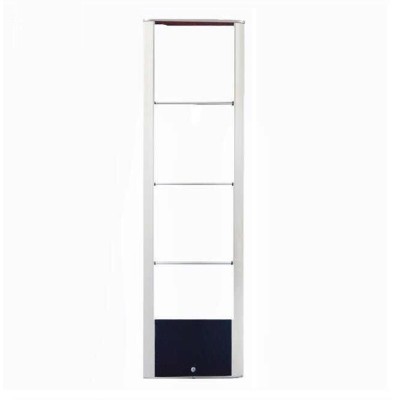
CW-1000B2 Single Security Gate (single gate)
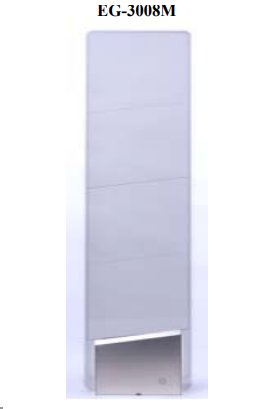
EG-3008M Anti-Theft Security Gate (single gate)

RFID security gate
SKU: RFID
Tagit Library Security Gate
SKU: TAGITAre you looking for products for this topic?
Việt POS distributes genuine products — 24-36 month warranty, 24/7 technical support.
Avoid installing RF security gates near strong signal-emitting devices such as WiFi routers, microwaves, or servers — these devices cause RF frequency interference and reduce sensor sensitivity. If the store has a complex structure (multiple floors, metal partitions), RF security gates need to be installed at each entry/exit point to avoid blind spots. According to Việt POS's deployment experience, proper installation location reduces false alarms by 20-30% and increases detection rates to 95-98%.
How to configure RF frequency to suit the Vietnamese environment?
RF frequency configuration is a crucial step for effective RF security gate installation. International standards use 8.2 MHz for RF systems, but some older RF security gates use 58 kHz. In Vietnam, 8.2 MHz is the common standard and is licensed by the Ministry of Information and Communications.
When installing RF security gates, technicians need to check the surrounding environment for potential sources of interference. If the store is near a mobile base station, radar station, or industrial zone, the sensor sensitivity needs to be adjusted lower to avoid interference. Some modern RF security gates support automatic frequency adjustment (auto-tuning) — this feature helps the system adapt to the environment and reduces false alarms by 15-25%.
How to calibrate RF security gate sensor sensitivity?
Sensor sensitivity calibration is an important fine-tuning step after RF security gate installation. Too high sensitivity causes false alarms when customers pass through the gate without carrying goods; too low sensitivity reduces the ability to detect unremoved tags. The ideal sensitivity level is 70-85% — enough to detect tags at a distance of 1-1.5 meters but without causing false alarms.
The RF security gate sensor sensitivity calibration process includes: (1) Placing test tags at different distances (0.5m, 1m, 1.5m) and recording sensor reactions; (2) Adjusting the sensitivity switch on the RF security gate control panel; (3) Repeating the test until the desired sensitivity level is achieved. Some RF security gates provide an adjustment interface via an LCD screen or mobile application — helping to fine-tune faster and more accurately.
Connecting RF security gates to POS systems and surveillance cameras
RF security gate installation is more effective when connected to POS systems and surveillance cameras. This connection allows recording alarm information, linking with sales data, and reviewing video in case of incidents. Most modern RF security gates support connections via RS-232, Ethernet, or WiFi cables.
To connect the RF security gate to the POS system: (1) Determine the supported connection type (RS-232, Ethernet, WiFi); (2) Configure the IP address and connection port on the RF security gate control panel; (3) Configure the POS software to receive alarm signals from the gate; (4) Test the connection by triggering an alarm and checking if the POS records it. Connecting to surveillance cameras is similar — configure the RF security gate to send a recording activation signal when an alarm is detected.
Periodic maintenance and optimization of RF security gates
Periodic maintenance of RF security gate installations helps maintain performance and extend equipment lifespan. Monthly, check: (1) Clean sensors and transmitting tubes with a soft, dry cloth; (2) Check electrical connections and data cables; (3) Test tags to ensure sensitivity remains stable; (4) Check alarm sound and LED lights.
Quarterly, perform: (1) Check the entire tag system — remove damaged or invalid tags; (2) Update frequency configuration if new interference is detected; (3) Check connections to POS and camera systems; (4) Record alarm data to analyze theft trends and adjust protection strategies. According to Việt POS's experience, periodic maintenance of RF security gate installations reduces emergency repair costs by 25-35% and increases system reliability to 98-99%.
To enhance RF security gate installation performance, consider: (1) Upgrading tags from passive to smart tags — detectable at longer distances; (2) Installing additional RF security gates at secondary exits; (3) Integrating data analysis systems to monitor theft trends and adjust protection strategies. Việt POS provides comprehensive RF security gate installation optimization services — contact 0935 498 384 for detailed consultation.
Việt POS's smart access control solution integrates RF security gates with other devices such as flap barriers, facial recognition systems, and AI cameras — creating a comprehensive protection system for Vietnamese businesses. See more security gate categories to choose the appropriate solution.
Are you looking for products for this topic?
Việt POS distributes genuine products — 24-36 month warranty, 24/7 technical support.
Tránh lắp đặt cổng từ an ninh RF gần các thiết bị phát sóng mạnh như router WiFi, lò vi sóng, hoặc máy chủ — những thiết bị này gây nhiễu tần số RF và làm giảm độ nhạy cảm biến. Nếu cửa hàng có cấu trúc phức tạp (nhiều tầng, vách ngăn kim loại), cần lắp đặt cổng từ an ninh RF tại từng điểm ra vào để tránh điểm mù. Theo kinh nghiệm Việt POS triển khai, vị trí lắp đặt hợp lý giảm 20-30% cảnh báo giả và nâng cao tỷ lệ phát hiện lên 95-98%.
Cấu hình tần số RF như thế nào cho phù hợp với môi trường Việt Nam?
Cấu hình tần số RF là bước quan trọng để lắp đặt cổng từ an ninh RF hiệu quả. Tiêu chuẩn quốc tế sử dụng tần số 8.2 MHz cho hệ thống RF, nhưng một số cổng từ an ninh RF cũ sử dụng 58 kHz. Ở Việt Nam, tần số 8.2 MHz là chuẩn phổ biến và được cấp phép bởi Bộ Thông tin và Truyền thông.
Khi lắp đặt cổng từ an ninh RF, kỹ thuật viên cần kiểm tra môi trường xung quanh để phát hiện các nguồn nhiễu tiềm ẩn. Nếu cửa hàng nằm gần trạm phát sóng di động, trạm radar, hoặc khu công nghiệp, cần điều chỉnh độ nhạy cảm biến thấp hơn để tránh nhiễu. Một số cổng từ an ninh RF hiện đại hỗ trợ tự động điều chỉnh tần số (auto-tuning) — tính năng này giúp hệ thống tự thích ứng với môi trường và giảm cảnh báo giả 15-25%.
Hiệu chỉnh độ nhạy cảm biến cổng từ an ninh RF như thế nào?
Hiệu chỉnh độ nhạy cảm biến là bước tinh chỉnh quan trọng sau khi lắp đặt cổng từ an ninh RF. Độ nhạy quá cao gây cảnh báo giả khi khách hàng đi qua cổng mà không mang hàng hóa; độ nhạy quá thấp làm giảm khả năng phát hiện tag chưa tháo gỡ. Mức độ nhạy lý tưởng là 70-85% — đủ để phát hiện tag ở khoảng cách 1-1.5 mét nhưng không gây cảnh báo giả.
Quy trình hiệu chỉnh độ nhạy cảm biến cổng từ an ninh RF bao gồm: (1) Đặt tag thử nghiệm ở các khoảng cách khác nhau (0.5m, 1m, 1.5m) và ghi lại phản ứng cảm biến; (2) Điều chỉnh công tắc độ nhạy trên bảng điều khiển cổng từ an ninh RF; (3) Lặp lại test cho đến khi đạt mức độ nhạy mong muốn. Một số cổng từ an ninh RF cung cấp giao diện điều chỉnh qua màn hình LCD hoặc ứng dụng di động — giúp tinh chỉnh nhanh hơn và chính xác hơn.
Kết nối cổng từ an ninh RF với hệ thống POS và camera giám sát
Lắp đặt cổng từ an ninh RF hiệu quả hơn khi kết nối với hệ thống POS và camera giám sát. Kết nối này cho phép ghi lại thông tin cảnh báo, liên kết với dữ liệu bán hàng, và xem lại video khi có sự cố. Hầu hết cổng từ an ninh RF hiện đại hỗ trợ kết nối qua cáp RS-232, Ethernet, hoặc WiFi.
Để kết nối cổng từ an ninh RF với hệ thống POS: (1) Xác định loại kết nối hỗ trợ (RS-232, Ethernet, WiFi); (2) Cấu hình địa chỉ IP và cổng kết nối trên bảng điều khiển cổng từ an ninh RF; (3) Cấu hình phần mềm POS để nhận tín hiệu cảnh báo từ cổng; (4) Test kết nối bằng cách kích hoạt cảnh báo và kiểm tra xem POS có ghi nhận được không. Kết nối với camera giám sát tương tự — cấu hình cổng từ an ninh RF gửi tín hiệu kích hoạt ghi hình khi phát hiện cảnh báo.
Bảo trì và tối ưu hóa cổng từ an ninh RF định kỳ
Bảo trì định kỳ lắp đặt cổng từ an ninh RF giúp duy trì hiệu suất và kéo dài tuổi thọ thiết bị. Hàng tháng, kiểm tra: (1) Vệ sinh cảm biến và ống phát sóng bằng khăn mềm khô; (2) Kiểm tra kết nối điện và cáp dữ liệu; (3) Test tag thử nghiệm để đảm bảo độ nhạy vẫn ổn định; (4) Kiểm tra âm thanh cảnh báo và đèn LED.
Hàng quý, thực hiện: (1) Kiểm tra toàn bộ hệ thống tag — loại bỏ tag hỏng hoặc mất hiệu lực; (2) Cập nhật cấu hình tần số nếu phát hiện nhiễu mới; (3) Kiểm tra kết nối với hệ thống POS và camera; (4) Ghi lại số liệu cảnh báo để phân tích xu hướng trộm cắp. Theo kinh nghiệm Việt POS, bảo trì định kỳ lắp đặt cổng từ an ninh RF giảm 25-35% chi phí sửa chữa khẩn cấp và nâng cao độ tin cậy hệ thống lên 98-99%.
Để nâng cao hiệu suất lắp đặt cổng từ an ninh RF, cân nhắc: (1) Nâng cấp tag từ thụ động sang tag thông minh (smart tag) — phát hiện được ở khoảng cách xa hơn; (2) Lắp đặt thêm cổng từ an ninh RF tại các lối thoát hiểm phụ; (3) Tích hợp hệ thống phân tích dữ liệu để theo dõi xu hướng trộm cắp và điều chỉnh chiến lược bảo vệ. Việt POS cung cấp dịch vụ tối ưu hóa toàn hệ thống lắp đặt cổng từ an ninh RF — liên hệ 0935 498 384 để được tư vấn chi tiết.
Giải pháp smart access control của Việt POS tích hợp cổng từ an ninh RF với các thiết bị khác như cổng flap barrier, hệ thống nhận diện khuôn mặt, và camera AI — tạo nên hệ thống bảo vệ toàn diện cho doanh nghiệp Việt. Xem thêm security gate categories để chọn giải pháp phù hợp.
Need specific equipment/solution consultation?
Việt POS responds within 30 minutes · 4 regional hotlines · Free survey.
Related products
Related articles



Cần tư vấn thiết bị/giải pháp cụ thể?
Việt POS phản hồi trong 30 phút · Hotline 4 vùng · Khảo sát miễn phí.
Bài viết cùng chủ đề