Mục lục bài viết (8)
- #What preparations are needed before installing a fingerprint time clock?
- #Should a fingerprint time clock connect via LAN or Wi-Fi?
- #What is the step-by-step fingerprint time clock installation process?
- #What are the technical considerations when installing a fingerprint time clock?
- #How long does fingerprint time clock installation take?
- #Post-installation support for fingerprint time clocks?
- Related products
- Related articles
Fingerprint time clocks are essential HR management devices for Vietnamese businesses today. However, installing a fingerprint time clock is not just about mounting the device on a wall and powering it on. This process requires meticulous preparation of infrastructure, software configuration, and connection testing to ensure stable long-term operation.
What preparations are needed before installing a fingerprint time clock?
Before installing a fingerprint time clock, the Việt POS technical team always conducts a detailed site survey. This step identifies the optimal location for the device, ensuring easy employee access and that the device is not affected by direct sunlight or high humidity.
Network infrastructure preparation is a key factor. If choosing a LAN connection, quality network cables and a stable router are required. If using Wi-Fi, check the Wi-Fi signal at the installation location to avoid connection loss. Additionally, prepare a stable power source, preferably with an uninterruptible power supply (UPS) to prevent device interruption during power outages.
Should a fingerprint time clock connect via LAN or Wi-Fi?
The choice between LAN and Wi-Fi depends on the business's needs and infrastructure conditions. A LAN connection offers high stability, fast data transfer speeds, and less interference. This is an ideal choice for businesses with existing network infrastructure or large-scale operations with multiple time clocks.
Bạn đang tìm sản phẩm cho chủ đề này?
Việt POS phân phối chính hãng — bảo hành 24-36 tháng, hỗ trợ kỹ thuật 24/7.


Looking for products related to this topic?
Việt POS is an official distributor — 24-36 month warranty, 24/7 technical support.
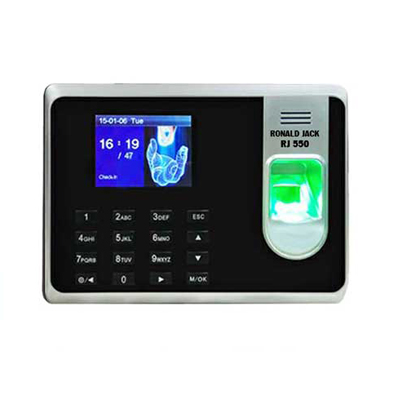
A Wi-Fi connection offers high flexibility, eliminates the need for complex network cable installation, and is easy to expand as the business grows. However, Wi-Fi can be affected by weak signals or interference from other devices. Ronald Jack 1800 Wifi, TM 3800 Wifi, 9300Pro Wifi fingerprint time clocks are designed to operate stably on 2.4GHz and 5GHz Wi-Fi connections.
| Connection Type | Advantages | Disadvantages | Suitable for |
|---|---|---|---|
| LAN | Stable, high speed, less interference | Requires cable installation, higher infrastructure cost | Large businesses, centralized offices |
| Wifi | Flexible, easy to install, quick expansion | Weak signal, interference, slower speed | Small businesses, scattered branches |
What is the step-by-step fingerprint time clock installation process?
The fingerprint time clock installation process includes 5 main steps. First, prepare the installation location by identifying a suitable wall or surface, ensuring a height of 1.2-1.5m from the ground for easy employee use. Second, install the hardware by mounting the device to the wall or a stand, checking for stability.
Third, connect power and network. If using LAN, plug the network cable into the Ethernet port. If using Wi-Fi, enable Wi-Fi mode on the device and connect to the business's Wi-Fi network. Fourth, configure the timekeeping management software on the server or cloud, synchronize employee data, and set up timekeeping rules. Fifth, test the connection by attempting to clock in with a test fingerprint, confirming that data is accurately recorded.
What are the technical considerations when installing a fingerprint time clock?
When installing a fingerprint time clock, common mistakes should be avoided. First, do not place the device in direct sunlight or near windows, as this affects the accuracy of the fingerprint sensor. Second, do not install the device in areas with high humidity or near water sources, as this can damage electronic components.
Third, ensure a distance of at least 3-5 meters from the device to the Wi-Fi router for stable signal. Fourth, regularly update the fingerprint time clock's firmware to fix security bugs and improve performance. Fifth, protect employee data by setting strong passwords for administrator accounts and enabling data encryption if the device supports it.
How long does fingerprint time clock installation take?
The time required for fingerprint time clock installation depends on the business's scale and infrastructure complexity. For small businesses with 1-2 time clocks, installation typically takes 1-2 days. For medium-sized businesses with 3-5 devices, it extends to 2-3 days. For large businesses with 6+ devices or complex network infrastructure, it can take 4-5 days.
Based on Việt POS's experience implementing in Vietnamese businesses, this time includes site survey (0.5 days), hardware installation (0.5-1 day), software configuration (1-2 days), and testing and employee training (1 day). To optimize time, it is advisable to have the network infrastructure ready before the technical team arrives for installation.
Post-installation support for fingerprint time clocks?
After fingerprint time clock installation, businesses need a maintenance and technical support plan. Việt POS provides 24/7 support via hotline 0935 498 384 or branches in HCM (0934 777 443), Da Nang (0905 999 656), Can Tho (0931 777 527), Hanoi (0937 845 333). The technical team is ready to handle connection issues, software configuration, or replacement of damaged components.
Additionally, Việt POS offers periodic maintenance services to check device status, update firmware, and optimize performance. Businesses should also train administrative staff to handle basic issues such as adding/removing employees, exporting timekeeping reports, or data recovery.
To learn more about comprehensive HR management solutions, or smart building solutions integrated with timekeeping, contact Việt POS now.
Need advice on specific equipment/solutions?
Việt POS responds in 30 minutes · 4 regional hotlines · Free survey.
Related products
Related articles


Cần tư vấn thiết bị/giải pháp cụ thể?
Việt POS phản hồi trong 30 phút · Hotline 4 vùng · Khảo sát miễn phí.
Bài viết cùng chủ đề